> ## Documentation Index
> Fetch the complete documentation index at: https://usepike.com/docs/llms.txt
> Use this file to discover all available pages before exploring further.
# Cost profile
> Set rates and capacity for profitability and forecasting.
Configure your employees or contractors rate and capacity in order to accurately track profitability and availability.
 ## Overview
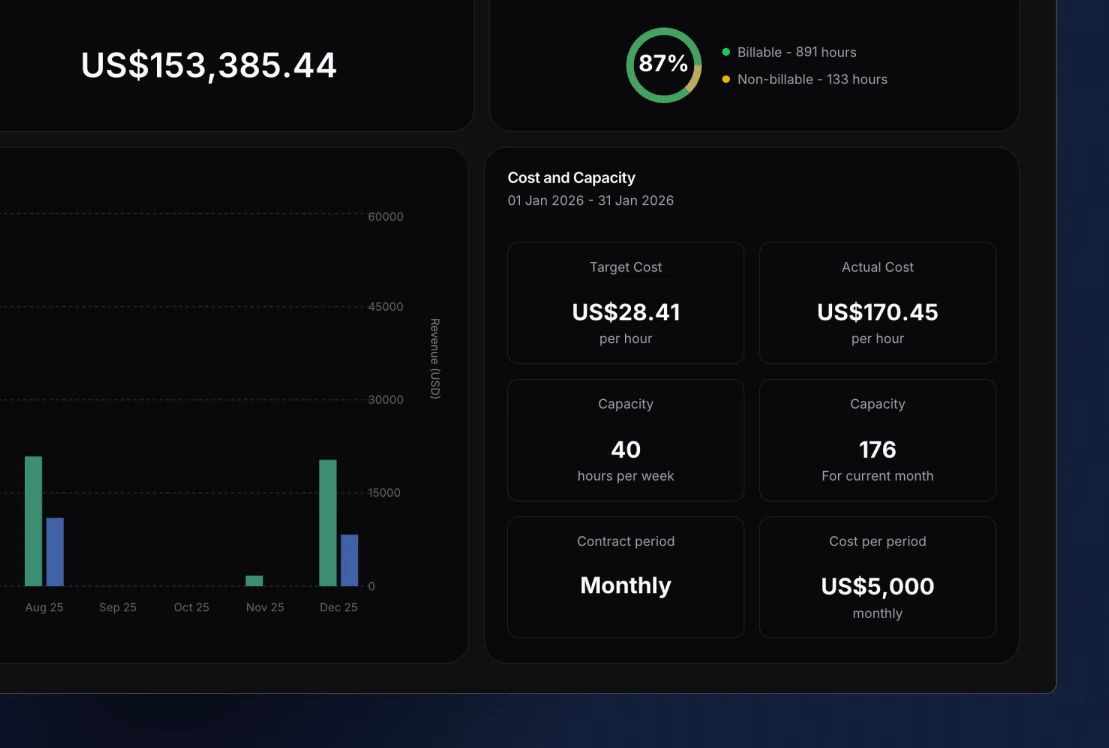
In the bottom right corner of a member's profile, you will find the Cost profile section.
This section converts a member’s salary and capacity into a consistent hourly cost, making it easier to understand profitability across projects and reports.
Here you can see the following metrics:
* **Hourly target cost**
`Calculated as: cost per period ÷ available working hours in the contract period`\
Represents the expected cost per hour if the member logs all available hours in the contract period. This serves as a stable benchmark for planning and profitability.
* **Actual hourly cost**
`Calculated as: accrued cost to date ÷ logged hours to date`\
Represents the real cost per hour based on how much time the member has actually logged relative to the cost incurred so far.\
For longer contract periods such as monthly and yearly, cost is prorated over time to ensure the number remains accurate throughout the period.
* **Capacity per week**
The number of hours the member is expected to work each week.
* **Capacity per contract period**\
The total available working hours in the selected contract period.\
This is calculated based on weekly capacity and the number of working days in that period.
* **Contract period**\
Defines the time frame used for cost and capacity calculations: hourly, weekly, bi-weekly, monthly, or yearly.
* **Cost per period**\
The total cost of the member for the selected contract period, typically their salary.
To ensure consistent and accurate reporting across Pike, all member costs are normalized into an hourly cost.
This allows direct comparison across projects, time periods, and teams.
## How calculations work
### Capacity
Capacity is derived from weekly availability:
`Daily capacity = capacity per week ÷ 5`
From this:
* Weekly capacity = capacity per week
* Bi-weekly capacity = capacity per week × 2
* Monthly capacity = daily capacity × working days in month
* Yearly capacity = daily capacity × working days in year
### Target hourly cost
Target hourly cost always uses the full contract period:
`Target hourly cost = cost per period ÷ capacity per period`
This represents the expected cost per hour assuming full utilisation.
### Actual hourly cost
Actual hourly cost is based on cost accrued over time, not the full contract value:
`Actual hourly cost = accrued cost to date ÷ logged hours to date`
Where:
`Accrued cost to date = cost per period × (elapsed working days ÷ total working days in period)`
This ensures that:
* numbers remain accurate throughout the period
* monthly and yearly contracts are not inflated early on
* reporting reflects real performance instead of timing distortions
## Calculations by contract period
### Hourly
* Capacity per period = n/a
* Target hourly cost = cost per period
* Actual hourly cost = cost per period
This is a direct hourly rate with no additional calculations.
### Weekly
* Capacity per period = capacity per week
* Target hourly cost = weekly cost ÷ capacity per week
* Actual hourly cost = accrued weekly cost to date ÷ logged hours to date
Since the period is short, accrued cost will typically equal the full weekly cost.
### Bi-weekly
* Capacity per period = capacity per week × 2
* Target hourly cost = bi-weekly cost ÷ (capacity per week × 2)
* Actual hourly cost = accrued bi-weekly cost to date ÷ logged hours to date
Cost is accrued proportionally across the two-week period.
### Monthly
* Daily capacity = capacity per week ÷ 5
* Capacity per period = daily capacity × working days in month
* Target hourly cost = monthly cost ÷ capacity per period
* Actual hourly cost = accrued monthly cost to date ÷ logged hours to date
Where accrued cost reflects how far into the month you are based on working days.
### Yearly
* Daily capacity = capacity per week ÷ 5
* Capacity per period = daily capacity × working days in year
* Target hourly cost = yearly cost ÷ capacity per period
* Actual hourly cost = accrued yearly cost to date ÷ logged hours to date
Where accrued cost reflects how far into the year you are, ensuring the metric remains accurate throughout the year.
## Contract setup
By opening the Cost profile section, you can define the following details for each member:
* Contract period\
Hourly, weekly, bi-weekly, monthly, or yearly
* Cost per period\
The salary for the selected contract period
* Capacity per week\
Expected working hours per week
* Contract effective from date\
Determines when the contract becomes active and from which point calculations apply
## Contract history
When setting up a contract for the first time, you define an effective from date.
To accommodate changes over time such as salary updates or changes in capacity, additional contracts can be created.
Each contract has its own effective from date, meaning:
* New values only apply from that date onward
* Previous contracts remain unchanged
* Historical reporting stays accurate
This is especially important for financial reports and dashboards, ensuring that past data always reflects the correct cost structure at the time.
## Overview
In the bottom right corner of a member's profile, you will find the Cost profile section.
This section converts a member’s salary and capacity into a consistent hourly cost, making it easier to understand profitability across projects and reports.
Here you can see the following metrics:
* **Hourly target cost**
`Calculated as: cost per period ÷ available working hours in the contract period`\
Represents the expected cost per hour if the member logs all available hours in the contract period. This serves as a stable benchmark for planning and profitability.
* **Actual hourly cost**
`Calculated as: accrued cost to date ÷ logged hours to date`\
Represents the real cost per hour based on how much time the member has actually logged relative to the cost incurred so far.\
For longer contract periods such as monthly and yearly, cost is prorated over time to ensure the number remains accurate throughout the period.
* **Capacity per week**
The number of hours the member is expected to work each week.
* **Capacity per contract period**\
The total available working hours in the selected contract period.\
This is calculated based on weekly capacity and the number of working days in that period.
* **Contract period**\
Defines the time frame used for cost and capacity calculations: hourly, weekly, bi-weekly, monthly, or yearly.
* **Cost per period**\
The total cost of the member for the selected contract period, typically their salary.
To ensure consistent and accurate reporting across Pike, all member costs are normalized into an hourly cost.
This allows direct comparison across projects, time periods, and teams.
## How calculations work
### Capacity
Capacity is derived from weekly availability:
`Daily capacity = capacity per week ÷ 5`
From this:
* Weekly capacity = capacity per week
* Bi-weekly capacity = capacity per week × 2
* Monthly capacity = daily capacity × working days in month
* Yearly capacity = daily capacity × working days in year
### Target hourly cost
Target hourly cost always uses the full contract period:
`Target hourly cost = cost per period ÷ capacity per period`
This represents the expected cost per hour assuming full utilisation.
### Actual hourly cost
Actual hourly cost is based on cost accrued over time, not the full contract value:
`Actual hourly cost = accrued cost to date ÷ logged hours to date`
Where:
`Accrued cost to date = cost per period × (elapsed working days ÷ total working days in period)`
This ensures that:
* numbers remain accurate throughout the period
* monthly and yearly contracts are not inflated early on
* reporting reflects real performance instead of timing distortions
## Calculations by contract period
### Hourly
* Capacity per period = n/a
* Target hourly cost = cost per period
* Actual hourly cost = cost per period
This is a direct hourly rate with no additional calculations.
### Weekly
* Capacity per period = capacity per week
* Target hourly cost = weekly cost ÷ capacity per week
* Actual hourly cost = accrued weekly cost to date ÷ logged hours to date
Since the period is short, accrued cost will typically equal the full weekly cost.
### Bi-weekly
* Capacity per period = capacity per week × 2
* Target hourly cost = bi-weekly cost ÷ (capacity per week × 2)
* Actual hourly cost = accrued bi-weekly cost to date ÷ logged hours to date
Cost is accrued proportionally across the two-week period.
### Monthly
* Daily capacity = capacity per week ÷ 5
* Capacity per period = daily capacity × working days in month
* Target hourly cost = monthly cost ÷ capacity per period
* Actual hourly cost = accrued monthly cost to date ÷ logged hours to date
Where accrued cost reflects how far into the month you are based on working days.
### Yearly
* Daily capacity = capacity per week ÷ 5
* Capacity per period = daily capacity × working days in year
* Target hourly cost = yearly cost ÷ capacity per period
* Actual hourly cost = accrued yearly cost to date ÷ logged hours to date
Where accrued cost reflects how far into the year you are, ensuring the metric remains accurate throughout the year.
## Contract setup
By opening the Cost profile section, you can define the following details for each member:
* Contract period\
Hourly, weekly, bi-weekly, monthly, or yearly
* Cost per period\
The salary for the selected contract period
* Capacity per week\
Expected working hours per week
* Contract effective from date\
Determines when the contract becomes active and from which point calculations apply
## Contract history
When setting up a contract for the first time, you define an effective from date.
To accommodate changes over time such as salary updates or changes in capacity, additional contracts can be created.
Each contract has its own effective from date, meaning:
* New values only apply from that date onward
* Previous contracts remain unchanged
* Historical reporting stays accurate
This is especially important for financial reports and dashboards, ensuring that past data always reflects the correct cost structure at the time.