


Best PSA software for digital agencies in 2026, compared
12 Oct 26
Share
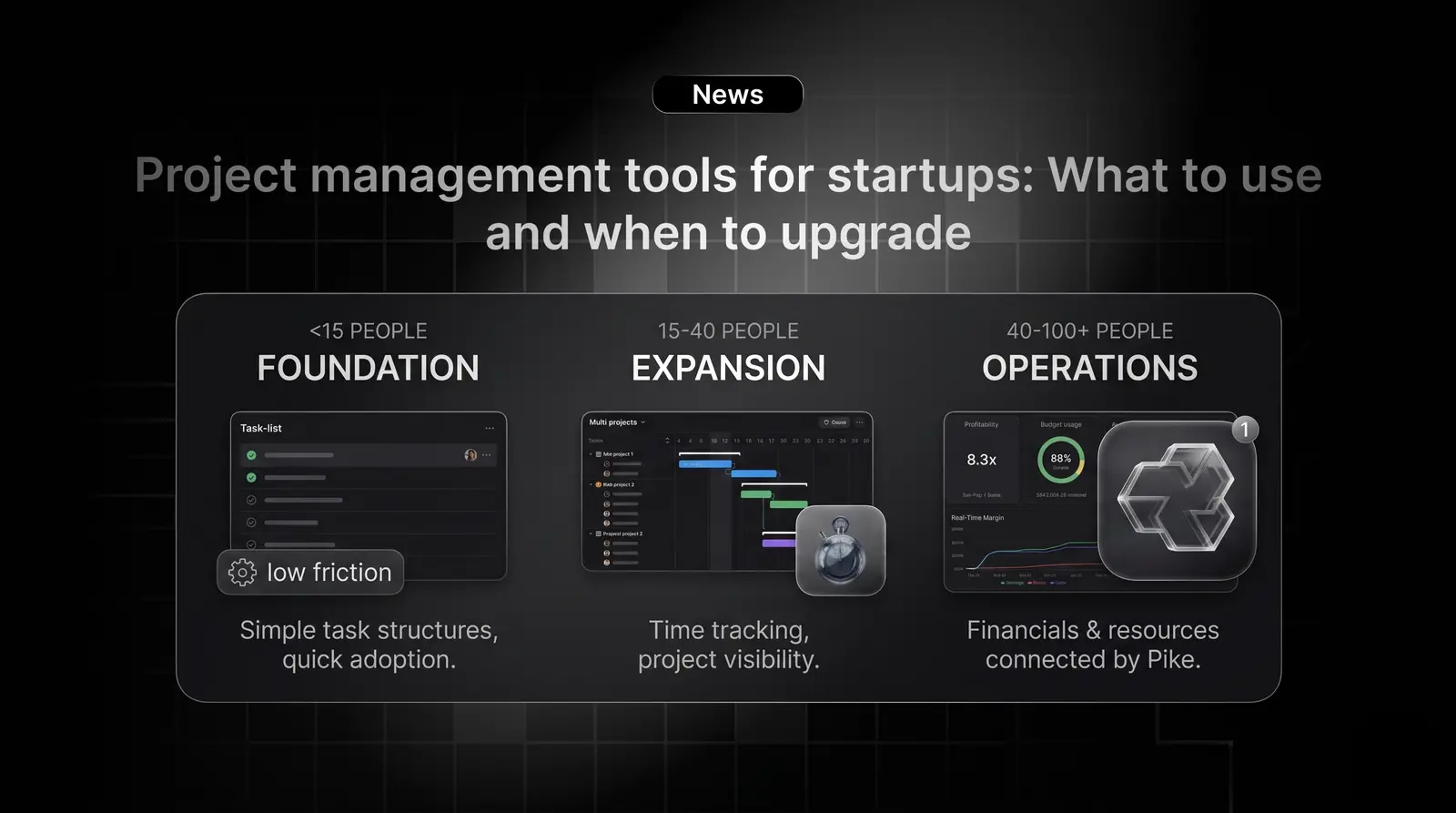
Startups pick a project management tool early and rarely revisit the decision until something breaks. That moment usually comes around the 30 to 50 person mark, when the team has grown, the client work has multiplied, and the original tool that handled task lists and Slack-synced updates stops producing any actual operational clarity.
The right project management tool for a startup depends almost entirely on where the business is and where it is going. A five-person product team needs something different than a 40-person service business. This guide walks through what matters at each stage and what to look for when evaluating your options.
The feature lists for most project management tools are nearly identical: tasks, subtasks, timelines, comments, file attachments, integrations. The differentiator is rarely the feature set. It is the operational model the tool supports.
Startups doing internal product work need speed and flexibility above all else. The work changes fast, priorities shift weekly, and the team needs to move without friction. Lightweight tools with simple task structures and good Slack integration tend to work well here.
Startups doing client work, whether that means agency services, consulting, or project-based delivery, have a different set of needs from day one. Tasks need to connect to clients. Hours need to connect to budgets. Delivery needs to connect to invoicing. A tool that does not support this structure will create a manual reconciliation layer that compounds as the business grows.
Stage 1: Under 15 people. Almost any tool works at this size. The team is small enough that everyone has context on every project, coordination happens in real time, and reporting is not yet a meaningful problem. Prioritise setup speed, low friction, and tools your team will actually use. Free tiers cover most needs here.
Stage 2: 15 to 40 people. This is where gaps start appearing. The team is large enough that not everyone has context on every project. Handoffs become more frequent. Reporting starts to matter. At this stage you need a tool that supports project visibility across multiple workstreams, some form of time tracking, and the ability to see what the team is working on without calling a meeting.
Stage 3: 40 to 100 people. At this scale, the project management tool is no longer just an operational tool. It is a financial one. You need to know project-level margin in real time, not after invoice. Resource planning needs to be systematic, not a spreadsheet. Billing cycles should close in days, not weeks. General project management tools rarely provide this natively.
The 30 to 50 person range is where most startups hit a specific wall. It is not that the tool stops working. It is that the tool was designed for task coordination and the business now needs something closer to an operational system.
The symptoms are consistent: weekly reporting takes a full day because data has to be pulled from multiple tools and reconciled manually. Project margins are estimated rather than calculated. The ops person or finance lead is spending significant time on administrative work that a connected system would eliminate. Someone has built a master spreadsheet to compensate for what the PM tool cannot do.
A 2022 study by Asana found that knowledge workers lose roughly 200 hours per year switching between applications and managing work about work. For a 40-person team, that loss is substantial in both time and cost.
When evaluating tools for the 20 to 100 person stage, the questions that matter most are not about features. They are about fit and trajectory.
Does it scale to your next stage, not just your current one? Tools that work at 20 people often require painful migration at 60. Ask specifically how the platform handles 50 to 100 person teams before committing.
Is time tracking native or bolted on? If time tracking requires a separate subscription and a weekly export-import, you will have a reconciliation problem at billing time. Native time tracking that connects directly to project budgets is far more valuable than a separate integration.
Can you see project profitability in real time? For service businesses especially, this is the question that separates operational tools from management tools. If you cannot answer "is this project on track financially?" without running a report, the tool is not giving you what you need.
What does adoption look like for non-PM roles? A tool that only project managers use produces incomplete data. Evaluate ease of use for the people who log time and update tasks daily, not just the people who configure the system.
Pike is built for the stage where task management is no longer enough. When a startup is running client projects, billing by time or deliverable, and trying to see profitability across multiple engagements simultaneously, connecting delivery data and financial data in one system changes how quickly decisions can be made. If you are at that stage and want to see how it works in practice, the Pike docs walk through the full platform.
For teams under 15 people, the priority is adoption over features. Any lightweight tool with good task structure and integrations with your existing communication tools will serve you well. The decision matters less than the habit of using it consistently.
The clearest signal is when someone builds a spreadsheet to compensate for something the tool cannot do. Other signals: reporting takes more than a few hours per week, billing requires reconciling data from multiple sources, or project managers cannot see budget status without running a manual report.
Early on, separate tools are manageable. As the team grows past 20 to 25 people, the manual reconciliation between a project management tool and a separate time tracker becomes a meaningful operational overhead. Consolidating to a platform that handles both natively is usually worthwhile at that point.
Native time tracking connected to project budgets. For any business that bills clients for time or deliverables, the ability to see live budget consumption against planned hours is more valuable than any task management feature. Without it, you are estimating margins rather than measuring them.
If your startup is past the early stage and you want to see what connected project and financial management looks like, book a demo with Pike.
Share
 ISO 27001
 GDPR
GDPR SOC 2 Type II
Built to keep sensitive client data secure and private.