














Pike
  • MCP
  • Pricing
  • Contact us
Log in
Live nowNow in Claude & ChatGPTConnect Pike to Claude & ChatGPT

Agency managementAgency managementbuilt around capacity and margins.built around capacity and margins.Agency managementAgency managementbuilt around capacity and margins.built around capacity and margins.

Projects, time, resources, and finances in one system, built for agencies and consultancies.

Contact sales
Custom insights dashboard with finance and utilization metrics, and Pike agent chat helping build a widget
Pike box logoPike
All systems operational
Company
BlogOur storySwitch playbookGet in touch
Product
ProjectsResourcing & capacityFinance & invoicingDashboardsCustomers & salesTime & absencePike MCP
Resources
DocsChangelogPrivacy policyTerms and conditionsGlossaryFAQ
Compare
All comparisonsvs Productivevs Scorovs Kantatavs Synergistvs Accelo
Language
EnglishDansk

Engineered around the 🌎

© 2026 Pike. All rights reserved.

Trusted by 500+ agencies and consultancies

  • Reference Logo Falck
  • Reference Logo Veolia
  • Reference Logo WPP
  • Reference Logo Dentsu
  • Reference Logo Prodware
  • Reference Logo Taleo
  • Reference Logo E&Enterprise
  • Reference Logo Grapes Worldwide
  • Reference Logo Hayden
  • Reference Logo Ogilvy

Built for professional services

Built for consultancies and agencies that need productivity and profit in one place. Fast, modern, and without the tool chaos.

Built around profit

Every hour, project, and client rolls up to the number you run the firm on: profit.

Everyone in the same tool

When the whole team works in one place, every hour and update lands in data you can trust.

Your business, live

Utilization, margin, and capacity update as work happens, so you decide on today's numbers.

One workspace

Replace separate tools for projects, time, capacity and reporting

All of it in one workspace, ready from day one.

JiraAsanamonday.comClickUpHarvestTogglClockifyFloatResource GuruExcelGoogle SheetsPower BILooker StudioTableau

Pike

Separate logins, separate data, and exports between every tool.

See how Pike compares
  • Projects
  • Resourcing & capacity
  • Finance & invoicing
  • Dashboards
  • Time & absence
  • Customers & sales
  • Integrations
  • Projects

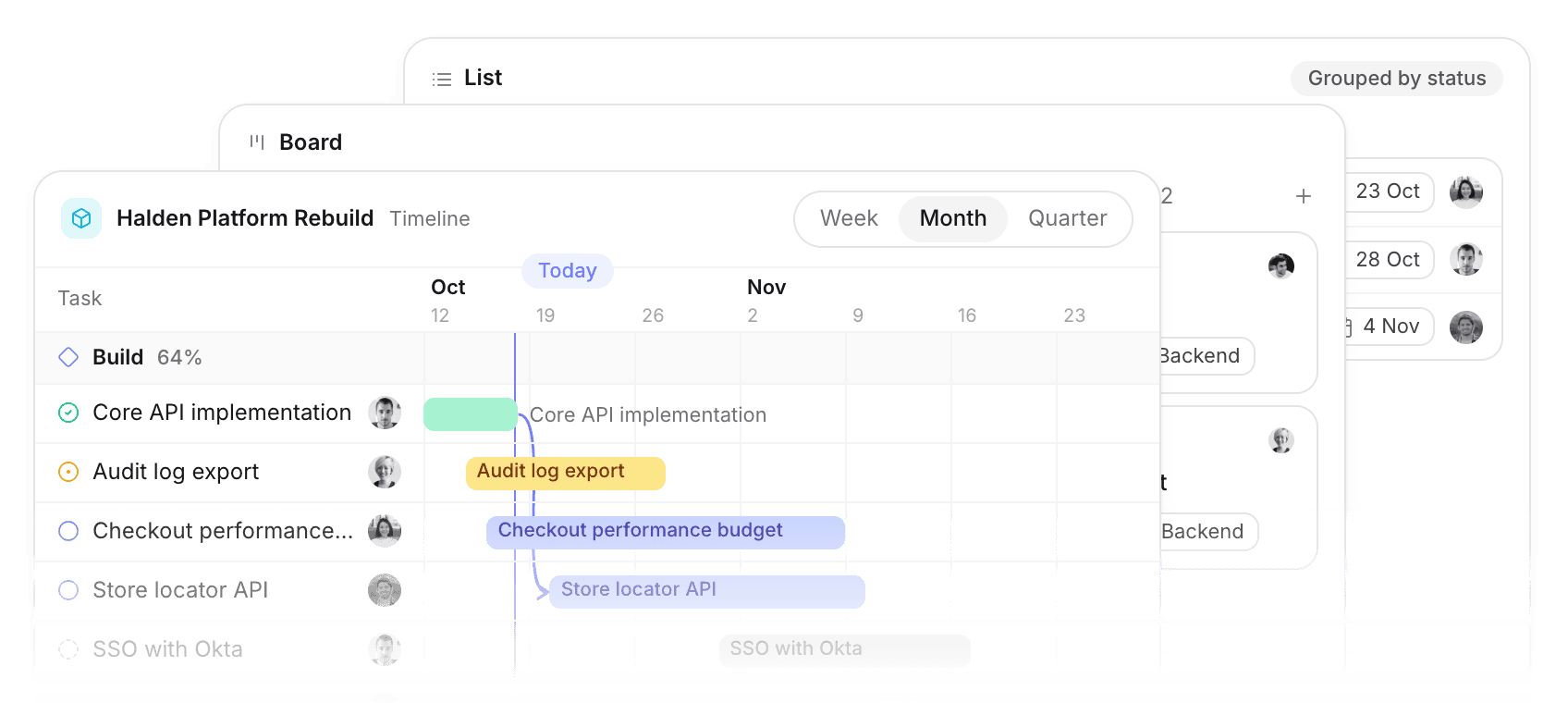
    Board, list, and timeline views with milestones, dependencies, and templates.

  • Resourcing & capacity

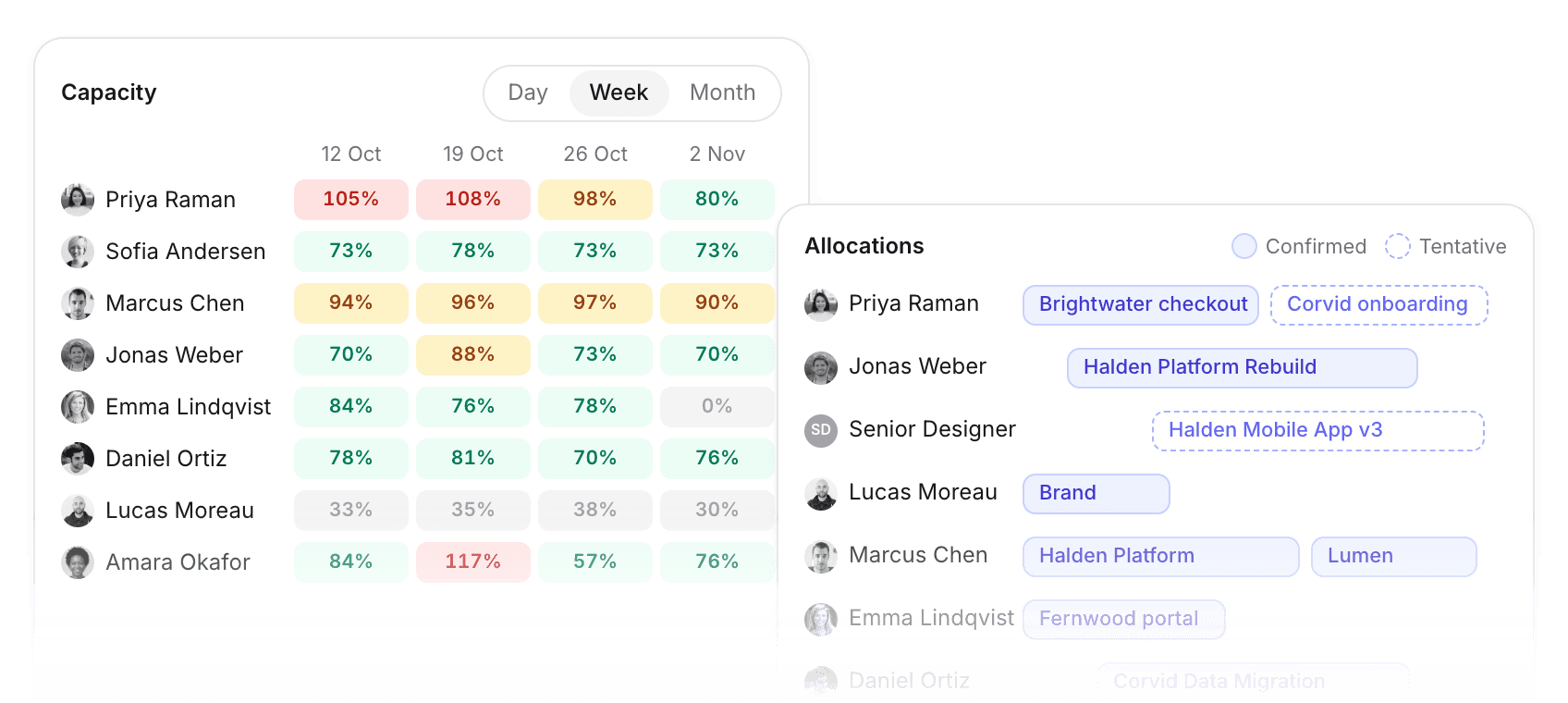
    See capacity at a glance, soft-book tentative work, and staff roles with placeholders.

  • Finance & invoicing

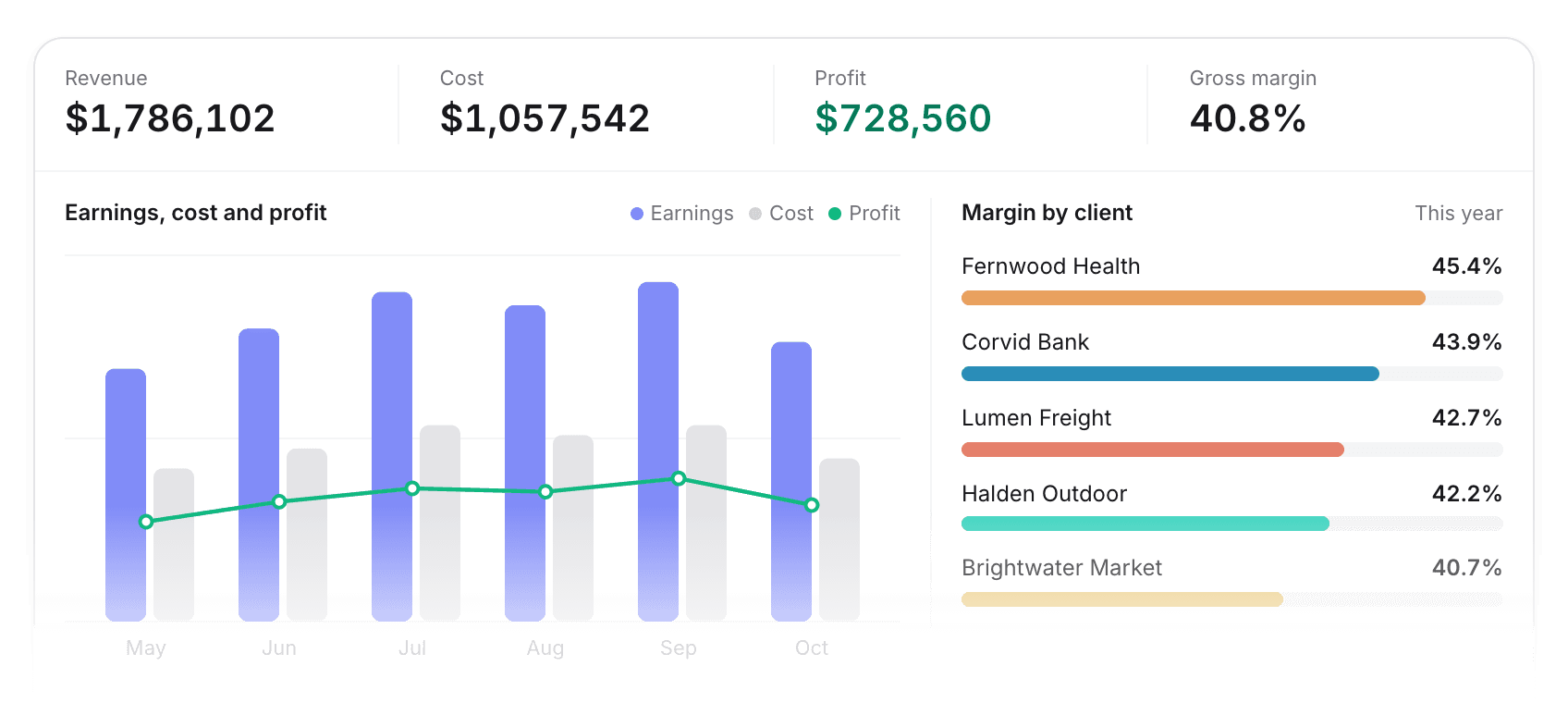
    Live margin by client, project, and team, with invoices that flow to your bookkeeping.

  • Dashboards

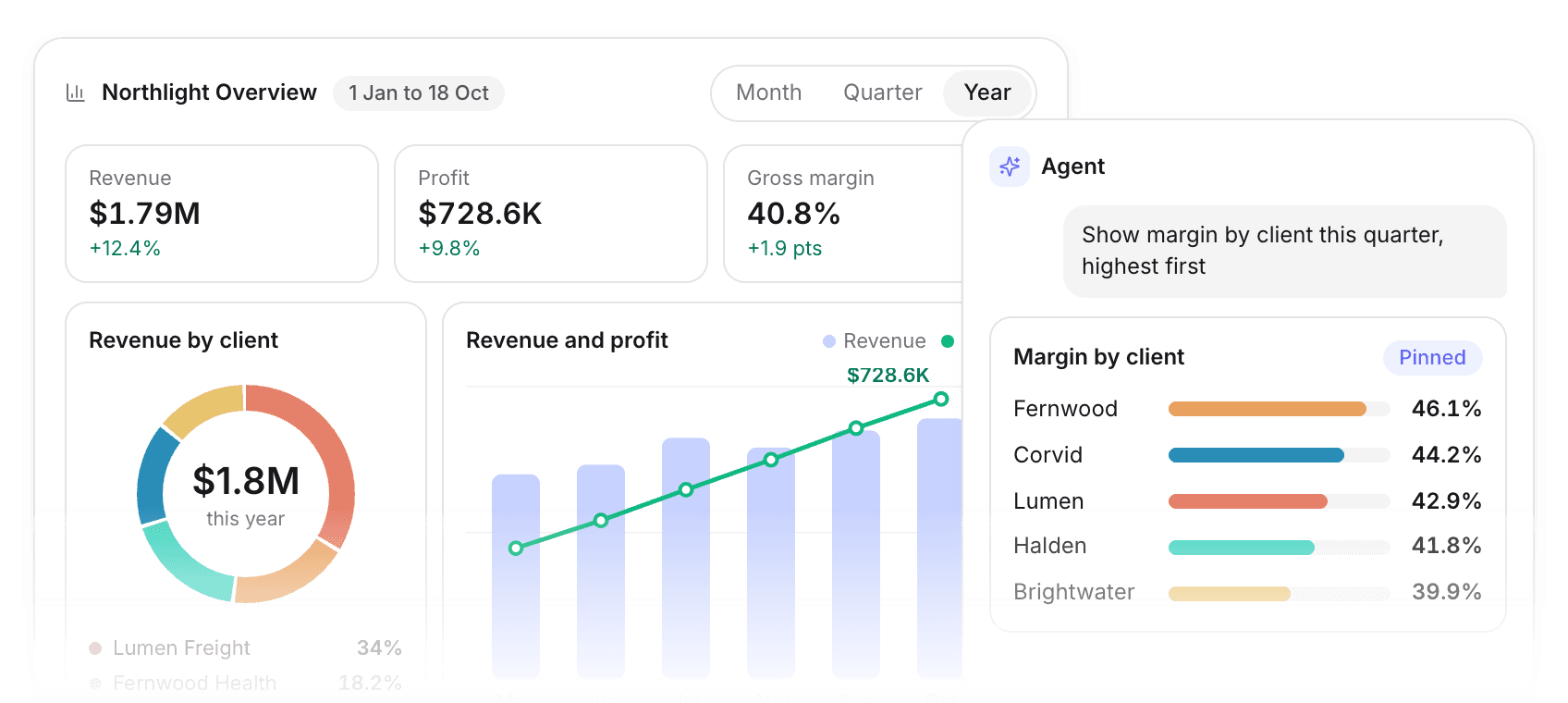
    The state of your business on one screen, filtered any way you ask.

  • Time & absence

    Timers, one-click logging, and approvals, with every hour priced into project financials.

  • Customers & sales

    Deals convert to projects, with pipeline, delivery, and profitability per customer.

  • Integrations

    Connect the tools you already use, with data flowing both ways.

Projects

Read more

A delivery tool your team will use

Tasks, updates, and deadlines in one place. You see a slip while it's still a scheduling problem.

Project management views showing board, list and timeline layouts for task organization in light mode
Pick a view
Board, list, and timeline of the same tasks.
Keep big projects in order
Milestones, dependencies, and subtasks on longer work.
Comments on the work
Comments, tags, and mentions stay on the task.
Start from a template
Reuse project and task templates at kickoff.

Resourcing & capacity

Read more

See who has capacity and who is full

One view of the team's hours against their capacity.

Light mode view of organizational resource allocation dashboard showing team capacity, project assignments and workload distribution
From a day to a year
Tomorrow's crunch or a year of utilization, by project, team, or person.
Tentative next to confirmed
Put proposed work against capacity before you say yes.
Book a role first
Staff by role, then swap in real people.
Move work between people
Drag assignments across the team. Capacity updates as you go.

Finance & invoicing

Read more

See margin as the work happens

Live margin on every client, project, and team.

Finance dashboard showing invoicing and profitability
Compare jobs side by side
Rank clients, projects, and teams by margin.
Filter profit how you need
Profit by customer, project, team, or the whole business.
Same as the books
Sync with QuickBooks, Xero, or e-conomic. Entered once.
Invoice the hours
Turn approved, unbilled time into invoice lines.

Dashboards

Read more

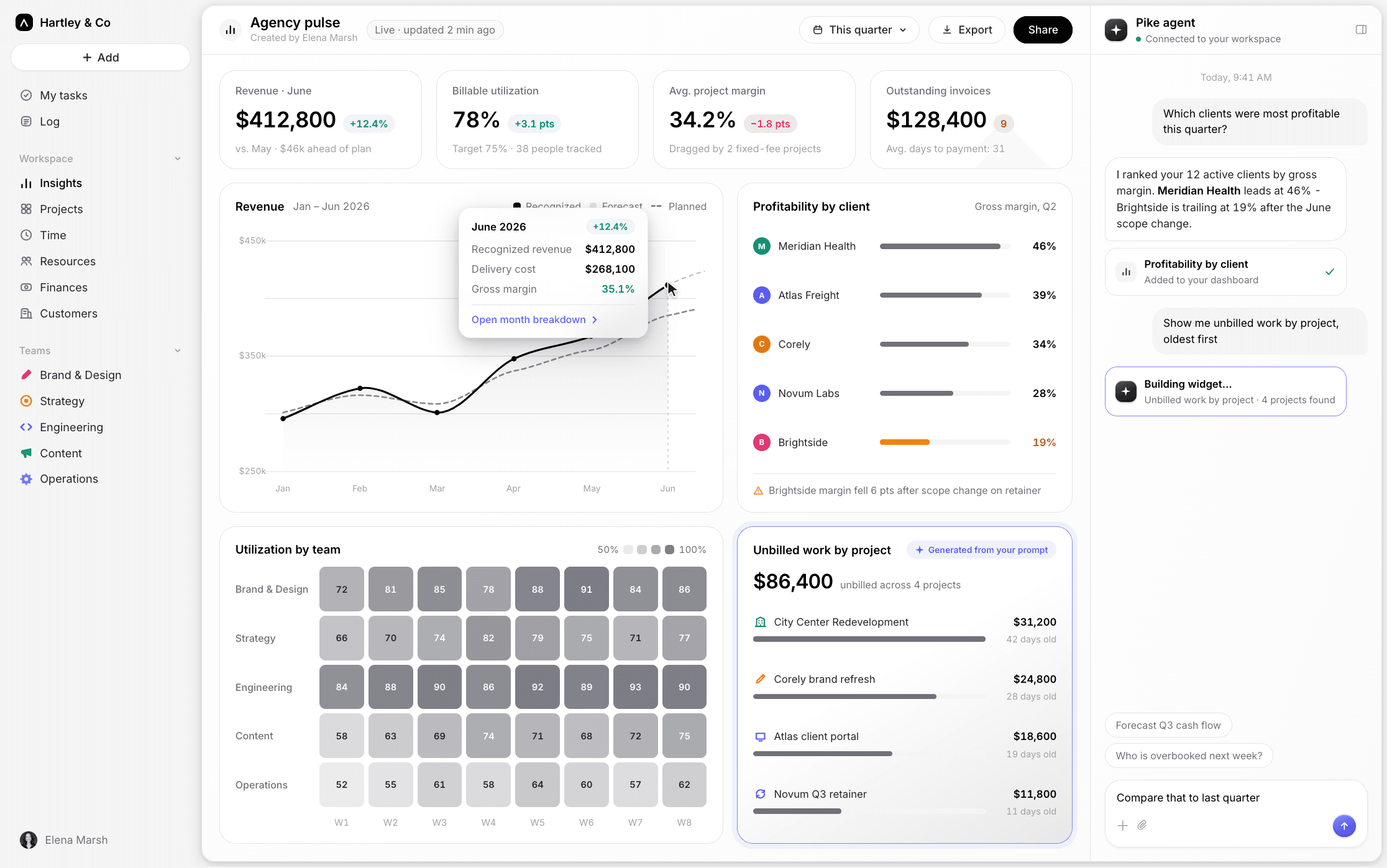
Your numbers, built by asking

Ask for the chart you need and pin it. Every role gets a view of live delivery data.

Northlight Overview dashboard with revenue and margin tiles, a utilization heatmap, and an agent pinning a margin by client chart
Build a widget by asking
Describe the chart in plain words and pin the result.
A view for every role
Partners, managers, and consultants each see what they need.
Filter by client or team
Narrow any dashboard by customer, project, team, or person.
Take it to Excel
Download a dashboard as a workbook, one sheet per widget.

Time & absence

Read more

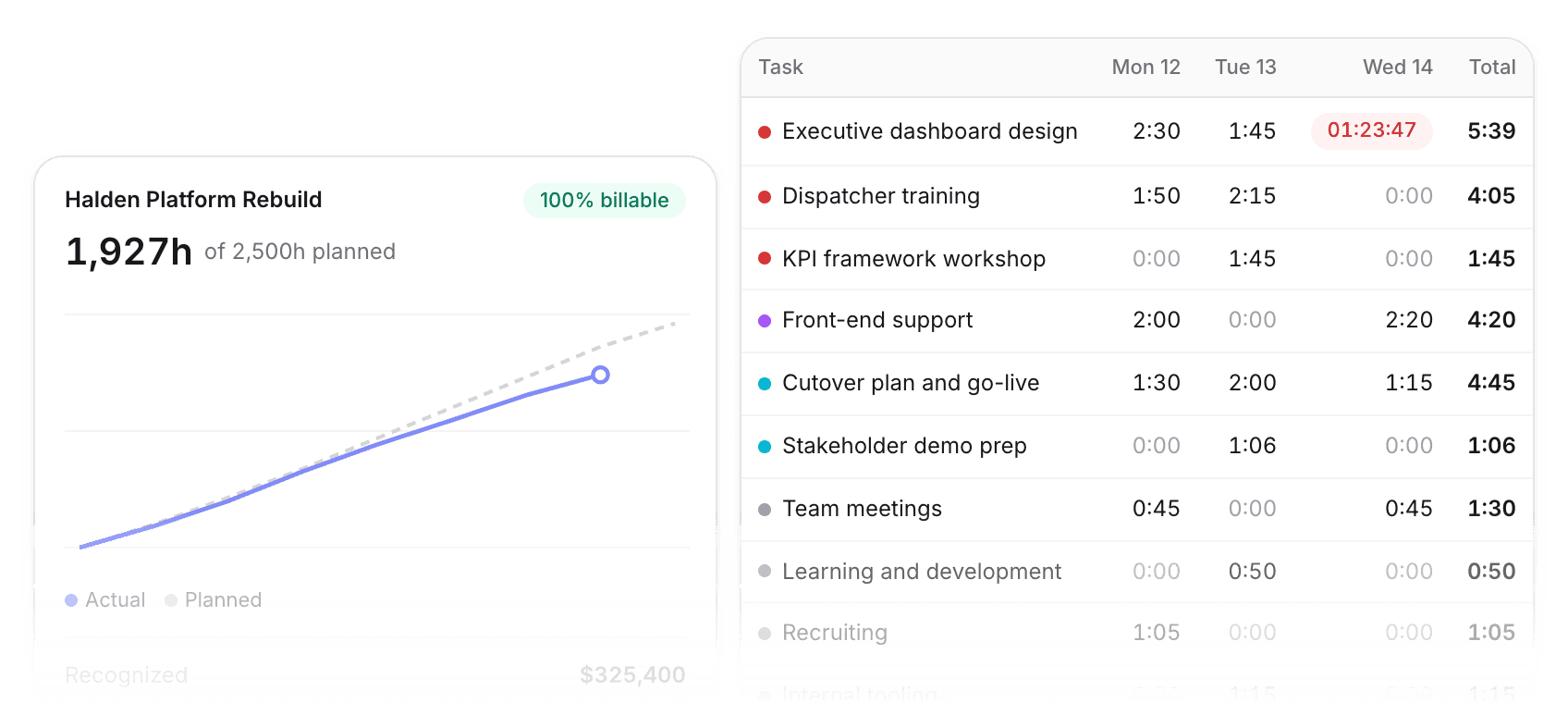
Hours you log show up in financials

Log time on the task. It lands in project financials.

Time planned vs actual chart in light mode
Start and stop a timer
Start, stop, and resume as you move between tasks.
Log from a task or timesheet
One click from a task, a list, or the weekly timesheet.
Set the rules once
Require notes and approvals, or keep it lightweight.
Hours as revenue
Break time down by project, team, or person as revenue.

Customers & sales

Read more

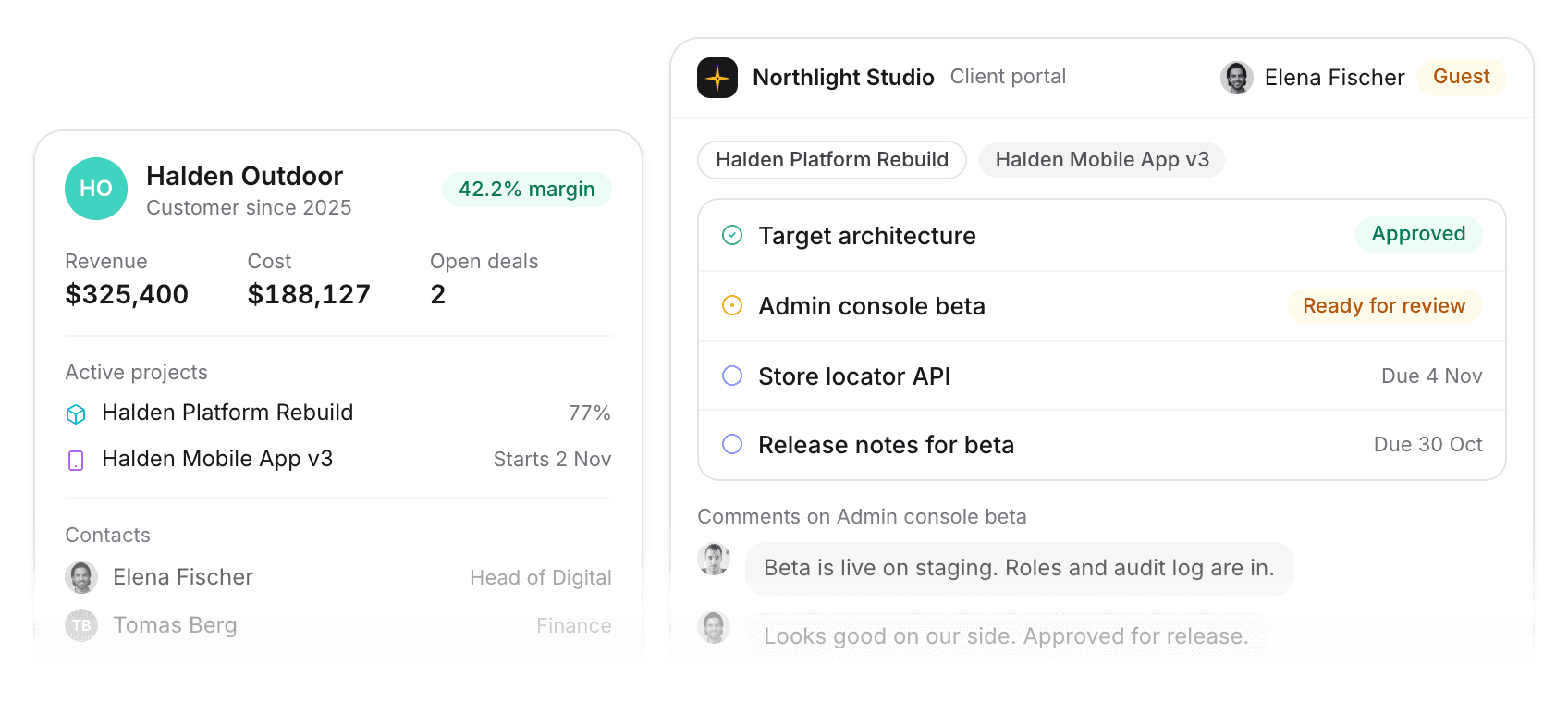
Deals, work, and profit for each customer

Sales and delivery share one record. You can see who to grow and who to reprice.

Halden Outdoor customer record with revenue, cost and margin, beside the client portal the customer sees
From deal to delivery
Deals convert into projects, so sales and delivery share one record.
Profit per customer
Profitability per customer, so you can see where the money is.
One thread per customer
Comments on customers and deals stay in one place.
A portal for clients
Clients can check progress without asking you.

Integrations

Connect the tools you already use

Slack, accounting, and CRM, or move data with CSV.

d365 integration logo
economic integration logo
gcal integration logo
gdrive integration logo
gmail integration logo
google integration logo
hubspot integration logo
onedrive integration logo
outlook integration logo
quickbooks integration logo
slack integration logo
teams integration logo
xero integration logo
zapier integration logo
d365 integration logo
economic integration logo
gcal integration logo
gdrive integration logo
d365 integration logo
economic integration logo
gcal integration logo
gdrive integration logo
gmail integration logo
google integration logo
hubspot integration logo
onedrive integration logo
outlook integration logo
quickbooks integration logo
slack integration logo
teams integration logo
xero integration logo
zapier integration logo
d365 integration logo
economic integration logo
gcal integration logo
gdrive integration logo
google integration logo
hubspot integration logo
onedrive integration logo
outlook integration logo
quickbooks integration logo
slack integration logo
teams integration logo
xero integration logo
zapier integration logo
d365 integration logo
economic integration logo
gcal integration logo
gdrive integration logo
gmail integration logo
google integration logo
hubspot integration logo
onedrive integration logo
outlook integration logo
google integration logo
hubspot integration logo
onedrive integration logo
outlook integration logo
quickbooks integration logo
slack integration logo
teams integration logo
xero integration logo
zapier integration logo
d365 integration logo
economic integration logo
gcal integration logo
gdrive integration logo
gmail integration logo
google integration logo
hubspot integration logo
onedrive integration logo
outlook integration logo
slack integration logo
teams integration logo
xero integration logo
zapier integration logo
d365 integration logo
economic integration logo
gcal integration logo
gdrive integration logo
gmail integration logo
google integration logo
hubspot integration logo
onedrive integration logo
outlook integration logo
quickbooks integration logo
slack integration logo
teams integration logo
xero integration logo
zapier integration logo
slack integration logo
teams integration logo
xero integration logo
zapier integration logo
d365 integration logo
economic integration logo
gcal integration logo
gdrive integration logo
gmail integration logo
google integration logo
hubspot integration logo
onedrive integration logo
outlook integration logo
quickbooks integration logo
slack integration logo
teams integration logo
xero integration logo
zapier integration logo
economic integration logo
gcal integration logo
gdrive integration logo
gmail integration logo
google integration logo
hubspot integration logo
onedrive integration logo
outlook integration logo
quickbooks integration logo
slack integration logo
teams integration logo
xero integration logo
zapier integration logo
d365 integration logo
economic integration logo
gcal integration logo
gdrive integration logo
gmail integration logo
economic integration logo
gcal integration logo
gdrive integration logo
gmail integration logo
google integration logo
hubspot integration logo
onedrive integration logo
outlook integration logo
quickbooks integration logo
slack integration logo
teams integration logo
xero integration logo
zapier integration logo
d365 integration logo
economic integration logo
gcal integration logo
gdrive integration logo
gmail integration logo
Pike Gradient logo
Productivity
Act on Slack and Teams messages and tasks without switching apps.
Bookkeeping
Invoices and expenses sync with QuickBooks, Xero, e-conomic, and more.
CRM
HubSpot, Salesforce, and more link deals straight to Pike customers.
Import and export
Move data in and out with CSV.

Projects

Read more

A delivery tool your team will use

Tasks, updates, and deadlines in one place. You see a slip while it's still a scheduling problem.

Project management views showing board, list and timeline layouts for task organization in light mode
Pick a view
Board, list, and timeline of the same tasks.
Keep big projects in order
Milestones, dependencies, and subtasks on longer work.
Comments on the work
Comments, tags, and mentions stay on the task.
Start from a template
Reuse project and task templates at kickoff.

Resourcing & capacity

Read more

See who has capacity and who is full

One view of the team's hours against their capacity.

Light mode view of organizational resource allocation dashboard showing team capacity, project assignments and workload distribution
From a day to a year
Tomorrow's crunch or a year of utilization, by project, team, or person.
Tentative next to confirmed
Put proposed work against capacity before you say yes.
Book a role first
Staff by role, then swap in real people.
Move work between people
Drag assignments across the team. Capacity updates as you go.

Finance & invoicing

Read more

See margin as the work happens

Live margin on every client, project, and team.

Finance dashboard showing invoicing and profitability
Compare jobs side by side
Rank clients, projects, and teams by margin.
Filter profit how you need
Profit by customer, project, team, or the whole business.
Same as the books
Sync with QuickBooks, Xero, or e-conomic. Entered once.
Invoice the hours
Turn approved, unbilled time into invoice lines.

Dashboards

Read more

Your numbers, built by asking

Ask for the chart you need and pin it. Every role gets a view of live delivery data.

Northlight Overview dashboard with revenue and margin tiles, a utilization heatmap, and an agent pinning a margin by client chart
Build a widget by asking
Describe the chart in plain words and pin the result.
A view for every role
Partners, managers, and consultants each see what they need.
Filter by client or team
Narrow any dashboard by customer, project, team, or person.
Take it to Excel
Download a dashboard as a workbook, one sheet per widget.

Time & absence

Read more

Hours you log show up in financials

Log time on the task. It lands in project financials.

Time planned vs actual chart in light mode
Start and stop a timer
Start, stop, and resume as you move between tasks.
Log from a task or timesheet
One click from a task, a list, or the weekly timesheet.
Set the rules once
Require notes and approvals, or keep it lightweight.
Hours as revenue
Break time down by project, team, or person as revenue.

Customers & sales

Read more

Deals, work, and profit for each customer

Sales and delivery share one record. You can see who to grow and who to reprice.

Halden Outdoor customer record with revenue, cost and margin, beside the client portal the customer sees
From deal to delivery
Deals convert into projects, so sales and delivery share one record.
Profit per customer
Profitability per customer, so you can see where the money is.
One thread per customer
Comments on customers and deals stay in one place.
A portal for clients
Clients can check progress without asking you.

Integrations

Connect the tools you already use

Slack, accounting, and CRM, or move data with CSV.

d365 integration logo
economic integration logo
gcal integration logo
gdrive integration logo
gmail integration logo
google integration logo
hubspot integration logo
onedrive integration logo
outlook integration logo
quickbooks integration logo
slack integration logo
teams integration logo
xero integration logo
zapier integration logo
d365 integration logo
economic integration logo
gcal integration logo
gdrive integration logo
d365 integration logo
economic integration logo
gcal integration logo
gdrive integration logo
gmail integration logo
google integration logo
hubspot integration logo
onedrive integration logo
outlook integration logo
quickbooks integration logo
slack integration logo
teams integration logo
xero integration logo
zapier integration logo
d365 integration logo
economic integration logo
gcal integration logo
gdrive integration logo
google integration logo
hubspot integration logo
onedrive integration logo
outlook integration logo
quickbooks integration logo
slack integration logo
teams integration logo
xero integration logo
zapier integration logo
d365 integration logo
economic integration logo
gcal integration logo
gdrive integration logo
gmail integration logo
google integration logo
hubspot integration logo
onedrive integration logo
outlook integration logo
google integration logo
hubspot integration logo
onedrive integration logo
outlook integration logo
quickbooks integration logo
slack integration logo
teams integration logo
xero integration logo
zapier integration logo
d365 integration logo
economic integration logo
gcal integration logo
gdrive integration logo
gmail integration logo
google integration logo
hubspot integration logo
onedrive integration logo
outlook integration logo
slack integration logo
teams integration logo
xero integration logo
zapier integration logo
d365 integration logo
economic integration logo
gcal integration logo
gdrive integration logo
gmail integration logo
google integration logo
hubspot integration logo
onedrive integration logo
outlook integration logo
quickbooks integration logo
slack integration logo
teams integration logo
xero integration logo
zapier integration logo
slack integration logo
teams integration logo
xero integration logo
zapier integration logo
d365 integration logo
economic integration logo
gcal integration logo
gdrive integration logo
gmail integration logo
google integration logo
hubspot integration logo
onedrive integration logo
outlook integration logo
quickbooks integration logo
slack integration logo
teams integration logo
xero integration logo
zapier integration logo
economic integration logo
gcal integration logo
gdrive integration logo
gmail integration logo
google integration logo
hubspot integration logo
onedrive integration logo
outlook integration logo
quickbooks integration logo
slack integration logo
teams integration logo
xero integration logo
zapier integration logo
d365 integration logo
economic integration logo
gcal integration logo
gdrive integration logo
gmail integration logo
economic integration logo
gcal integration logo
gdrive integration logo
gmail integration logo
google integration logo
hubspot integration logo
onedrive integration logo
outlook integration logo
quickbooks integration logo
slack integration logo
teams integration logo
xero integration logo
zapier integration logo
d365 integration logo
economic integration logo
gcal integration logo
gdrive integration logo
gmail integration logo
Pike Gradient logo
Productivity
Act on Slack and Teams messages and tasks without switching apps.
Bookkeeping
Invoices and expenses sync with QuickBooks, Xero, e-conomic, and more.
CRM
HubSpot, Salesforce, and more link deals straight to Pike customers.
Import and export
Move data in and out with CSV.

Pike MCP

Ask your AI about the business, then act on it

Connect Pike to Claude, ChatGPT or Gemini. Ask about margin and status, then plan and update projects from the chat.

MarginWhich clients dropped below 30% margin this quarter?
TimesheetsWho hasn't submitted their timesheet for last week?
PlanningPlan a 6-week discovery sprint for Meridian Health with phases and owners, then create it in Pike.
UtilizationWhat was billable utilization per team in September?
CapacityWho has room for a three-week discovery sprint starting Monday?
MarginWhich fixed-fee projects are trending over budget?
BillingShow unbilled hours by project, oldest first.
ReportsEvery Monday at 8, post my briefing to #leadership in Slack.
DeliveryWhich tasks are overdue on Acme Phase 2, and who owns them?
TimesheetsLog 2 hours on Acme Phase 2 for today's client workshop.
TimesheetsCompare planned vs. logged hours for the design team this month.
ClaudePikevia MCP

Ask your AI about Pike

Which clients dropped below 30% margin this quarter?

Answered from live workspace data

Works in the AI you already use

One server URL for Claude, ChatGPT, Gemini, Cursor and any other MCP client.

Ask, then make the change

Plan a project, move a deadline or book someone, and see it in Pike straight away.

Your permissions travel with you

You sign in with Pike, so the assistant only sees what you can already see in the app.

Explore Pike MCP

From a few people
who run your kind of firm

Founders, ops, and finance people describing the tools they used and what they check now.

Thomas Berg

“

“We know whether we can deliver new work before we commit to it.”

Tentative work and staffing changes kept slipping into side spreadsheets next to Kantata.Pike shows proposed and confirmed work in one capacity view, so I no longer rebuild the week every Monday.

TB

Thomas Berg

Managing partner, 35-person consultancy

“We've turned hours of monthly admin into work the team can actually bill for.”

PN

Priya Nair

Head of operations, 50-person digital agency

User satisfaction
+76%
Admin time
-34%
Data entry
3x faster
Data accuracy
+46%

Your agency runs better on Pike.

Contact sales
  • ISO 27001 CertifiedISO 27001
  • GDPR CompliantGDPR
  • AICPA SOC 2 Type IISOC 2 Type II

Built to keep sensitive client data secure and private.