Best project management software for marketing agencies
06 Oct 26
Share
Most agencies manage client relationships across at least four different places: a CRM for contacts, a project tool for tasks, a spreadsheet for budgets, and their inbox for everything else. Nobody designed this setup. It accumulated. And it works right up until a client asks a simple question that requires checking all four.
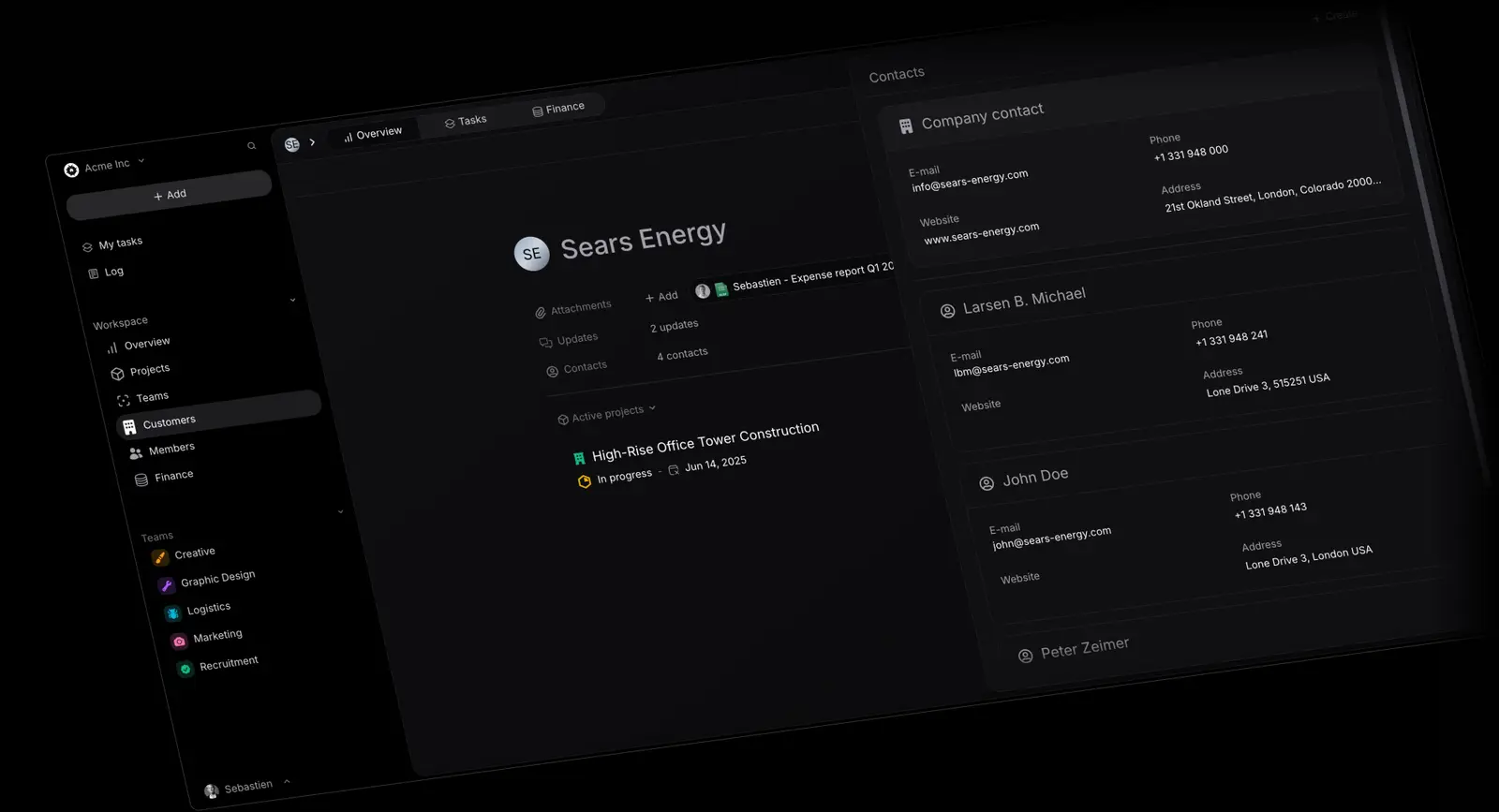
A client management interface is the single place where your team can see everything relevant to a client relationship: active projects, budget position, key contacts, outstanding invoices, and delivery history. Most tools offer pieces of this. Few connect all of it. This guide explains what to look for, what the most common gaps are, and what changes when client context and delivery data live in the same place.
A client management interface is not a CRM. A CRM tracks contacts, deals, and pipeline. A client management interface tracks relationships that have converted: active clients, ongoing projects, budget spend, hours logged, invoices raised, and open issues. It answers the operational question rather than the sales question. For a broader breakdown of agency management platforms that include this layer, see our agency management software guide. For how PSA software connects client management with delivery and finance, see our PSA software guide.
For agencies and professional services firms, the operational question is usually some version of: what is happening with this client right now? How much of the budget has been used? Are we on track to deliver on time? Is the relationship healthy? These are delivery and financial questions, not sales questions, and most CRMs are not built to answer them.
The best client management interfaces for agencies bring three things together: who the client is (contacts, relationship context, history), what you are delivering for them (active projects, timelines, scope), and whether it is profitable (hours logged, budget consumed, remaining margin). When all three are visible in one place, account managers spend less time chasing information and more time managing the relationship.
CRMs are built for pipeline management. They excel at tracking leads through stages, automating follow-up sequences, and forecasting revenue from deals that have not yet closed. Once a deal closes and becomes a live client engagement, the CRM's operational usefulness drops significantly.
The delivery happens elsewhere: in a project management tool, a time tracker, a shared drive, and a spreadsheet someone built to bridge the gaps. The CRM still holds the contact record and the original deal value, but it has no visibility into whether the project is on track, how many hours have been logged, or whether the engagement is profitable. Account managers have to pull this information from three or four places before every client call.
The SPI Research Professional Services Maturity Benchmark consistently finds that firms with fragmented tool stacks spend significantly more time on internal reporting and coordination than firms with integrated platforms. The hidden cost is not just the time lost switching between systems. It is the decisions made without complete information.
Agencies with 20 or more clients typically reach a point where the spreadsheets and tool-switching stop scaling. Not because the team is disorganised, but because the volume of information becomes unmanageable without a proper client management layer.
The right interface for an agency needs to do more than store contacts. These are the capabilities that matter most when evaluating your options.
**Client-level financial visibility. **You should be able to see, for any given client, the total budget contracted, hours logged to date, and the remaining budget. If a tool cannot show you this without a manual export, it is not doing the job. This connects directly to the agency profitability metrics that determine whether the business is actually growing or just busy.
**Project overview by client. **A client relationship is typically a portfolio of projects, not a single engagement. The interface should let you see all active and completed projects for a client in one view, with their current status, timeline, and budget position. This is what separates a proper client management interface from standard agency project management tools that track work without the financial layer.
**Contact management connected to delivery. **You need to know who the right people are at a client, but also which of those people is the decision-maker on a specific project, who raised the last issue, and who approved the last scope change. Contact records that exist separately from project records make this harder than it needs to be.
**Activity and communication history. **A new account manager taking over a client relationship should be able to get up to speed from the interface. Meeting notes, key decisions, escalations, and relationship history should all be accessible in one place, not scattered across email threads and shared documents.
The signals that a client management interface is needed tend to be consistent across agencies of different sizes. If more than two of these apply, the current setup is not scaling.
Account managers spend 30 minutes before every client call pulling together a status update from different tools. Invoicing is delayed because nobody is confident what has been delivered or whether the budget tracker is current. When a client asks how much budget is remaining, the answer requires checking a spreadsheet, a project tool, and a time tracker before anyone can respond. Onboarding a new account manager on an existing client takes two or more days because the context is scattered across systems.
None of these are people problems. They are tool problems. The information exists somewhere. It is just not accessible in the way the work actually requires.
Pike was built to solve this problem. Every project sits inside a client record, every logged hour updates the budget position automatically, and every invoice is generated from actual delivery data rather than a manually reconciled spreadsheet. This makes project budget tracking visible at the client level in real time, not as a separate exercise completed after delivery is done.
For agencies managing multiple concurrent client engagements, this removes the reporting overhead that typically takes one to two days per week per account manager. Combined with live capacity planning, it gives leadership a real-time view of client health, team utilisation, and project profitability in one system. If your current process involves pulling information from three or more places before every client call, a Pike demo shows what it looks like when that is no longer necessary.
Share
 ISO 27001
 GDPR
GDPR SOC 2 Type II
Built to keep sensitive client data secure and private.