

Alternatives guide
Best Streamtime alternatives for your business in 2026
Snapshot
Why teams look for Streamtime alternatives
Streamtime is job management software from Australia, built for creative businesses: agencies, in-house creative teams and architects. Jobs carry their plan, schedule, time, quote, expenses and invoices, and reports cover work in progress, client profitability and team capacity.
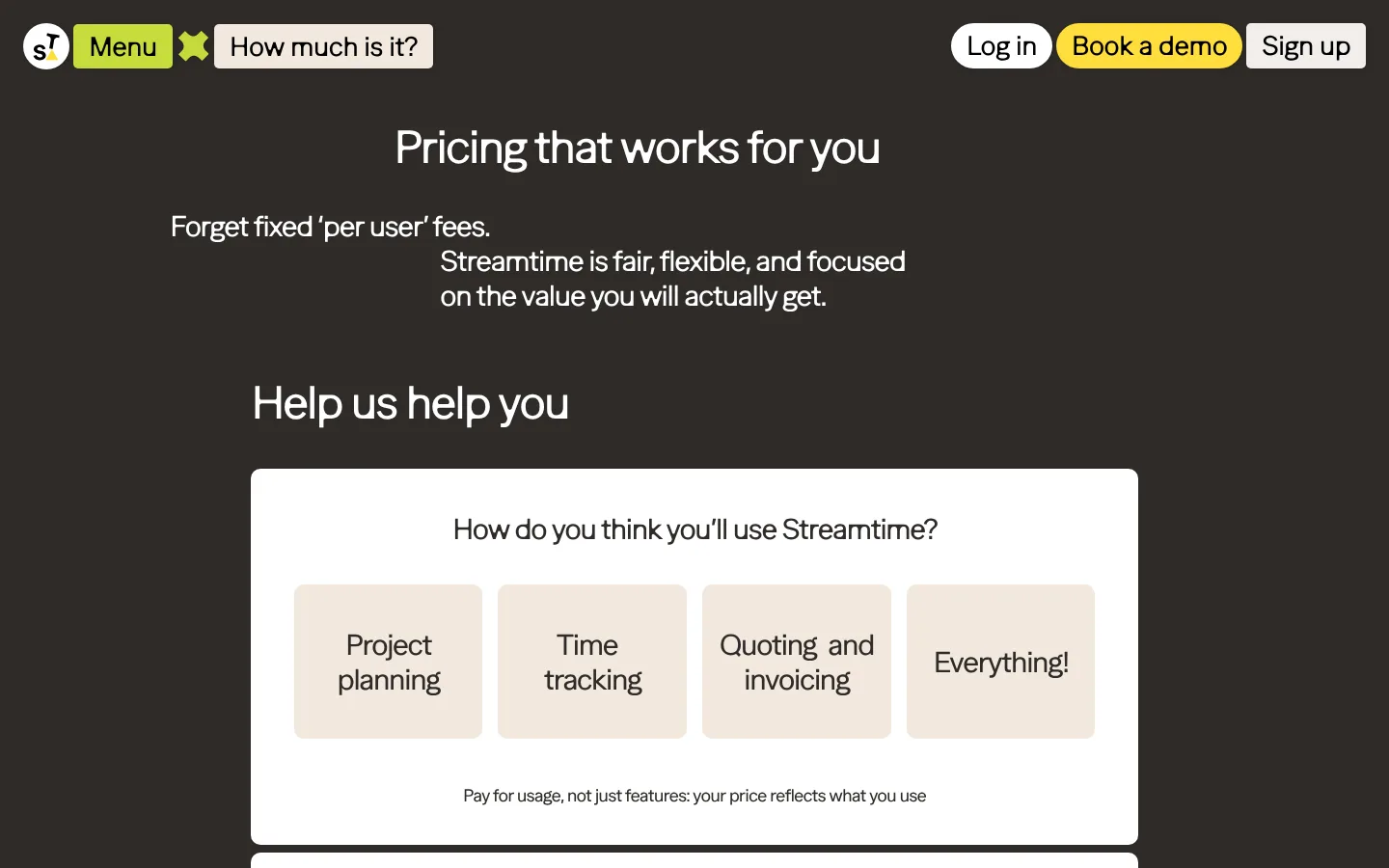
Streamtime does not publish a price. Its pricing page asks how many permanent staff and monthly freelancers you have, your annual revenue, and which features you expect to use, then gives one monthly price. For a finance lead building next year’s budget, that means a sales conversation before any comparison.
Teams also look elsewhere when the business grows past pure creative work. A studio that adds consulting retainers, a sales pipeline or several entities often wants deals, resourcing and margin reporting in the same system as the jobs.
Top pick
1. Pike
Pike suits creative and service businesses that like Streamtime’s job-first approach but want a published price and a clearer view of margin while work is in flight.
In Pike, every project carries its budget, tasks, team allocations, time entries, expenses and invoices. Cost and profit update as people log hours. A studio lead sees which clients are margin-positive this week, not after the month closes.
Pike also covers the work around the job: deals in a pipeline that turn into projects, resource planning across the whole team, time off, a customer portal, and invoices that go to Xero or QuickBooks.
Before launch, the Pike team maps your job structure, rate cards and reports with you, then stays involved as your mix of work changes.
Best for: Creative and service businesses that want a published per-user price and project profit that updates as the team logs time.
Pricing: Core $29 per user per month billed yearly ($35 monthly), Growth $49, Scale $99, Enterprise custom. Profitability, deals, retainers, the customer portal and full resource management start on Growth.
See every Pike plan and what each one includes on the pricing page.
Why teams switch from Streamtime to Pike
| Reason | What it means |
|---|---|
| A price you can budget | Pike lists its plans per user per month. You can cost a year of software before you speak to anyone. |
| Margin by client while work runs | Each time entry updates project cost and profit. You see a client sliding below target before the invoice goes out. |
| Sales pipeline in the same system | Deals live next to projects. A won deal becomes a project, and estimates sit beside actuals. |
| Room for non-creative work | Retainers and one-off projects run in the same system, which helps when a studio adds consulting or strategy work. Retainers start on Growth. |
| Setup done with you | The Pike team configures projects, rates and reports with your team before go-live. |
What Streamtime costs
Streamtime has no public plans or per-user prices. Its pricing page describes the model as one monthly price based on usage, and asks four questions to estimate it.
| Plan | Price per user per month | What the plan adds |
|---|---|---|
| Inputs | Quoted after you submit the estimator | Number of permanent team members, average freelancers per month, annual revenue estimate |
| Features | Reflected in the quoted price | Project planning, time tracking, quoting and invoicing, or everything |
| Billing | One monthly price | Six currencies offered: GBP, AUD, USD, NZD, CAD and EUR |
Checked on streamtime.net/pricing on 2 November 2026. Streamtime showed no price on the page; ask for a written quote for your team size before comparing it with per-user tools.

Quick comparison
| Tool | Best for | Key strength | Key difference vs Streamtime |
|---|---|---|---|
| Pike | Studios and service businesses that want published per-user pricing and live project margin | Projects, time, resourcing, deals, invoicing and profitability in one system | A public price per user, and profitability by project and client as time is logged. |
| WorkflowMax | Job-based teams that run quotes, timesheets and invoices | Quoting, jobs, timesheets, invoicing and purchase orders | Published per-user plans; capacity planning only on the 10-user Advanced plan. |
| Productive | Teams that plan by budget and booked hours | Budgets, resource planning, profitability and reporting | More budget and resourcing depth, with a 3-seat minimum. |
| Scoro | Teams that want CRM and quoting with delivery | CRM, quotes, projects, invoicing and financial reporting | Covers the sales side Streamtime leaves out; 5-user minimum. |
| Teamwork | Client service teams running many projects | Tasks, workload planning, time and client billing | Delivery-first; profitability insights need the Optimize plan. |
| Asana | Creative teams that mainly need task coordination | Project views, briefs, automation and integrations | Easy to adopt, but no quoting, invoicing or job costing. |
WorkflowMax is the closest match to Streamtime in shape: both are job-based, both came out of the Australia and New Zealand market, and both connect to Xero. Xero retired the original WorkflowMax in June 2024, and BlueRock now sells WorkflowMax by BlueRock.
Unlike Streamtime, WorkflowMax publishes its prices. Essentials covers quoting, jobs, scheduling, timesheets, invoicing, purchase orders and Xero or QuickBooks for 3 to 25 users. Leads and job phases start on Pro, and capacity planning sits on Advanced from 10 users.
The fit for creative work is less specific. WorkflowMax positions itself for service businesses in general, and its plans gate capacity planning higher than a small studio may want to pay for.
Pricing: Essentials $7.50, Pro $13.50, Advanced $22.50 per user per month billed yearly; minimums of 3, 5 and 10 users
Pros
- Published per-user pricing with quarterly and yearly discounts
- Quote, job, timesheet and invoice workflow similar to Streamtime
- Xero and QuickBooks integration on every plan
Cons
- Capacity planning only on Advanced, which needs 10 users
- Essentials caps at 25 users
Best for: Job-based teams that want Streamtime’s workflow shape with a published price.
Key trade-off: Easier to price than Streamtime, with planning features gated to higher plans.
Since you're already here, feel free to read the entire WorkflowMax vs Pike comparison here. We keep it honest.
Productive is built for service businesses and covers budgets, resource planning, time tracking, expenses, reporting and profitability. Where Streamtime starts from the job, Productive starts from the budget and the hours booked against it.
For a studio that already thinks in retainers and fixed-fee budgets, that model gives clear burn tracking. Productive also publishes its pricing, with a 3-seat minimum.
Check the plan before comparing cost. Rate cards and billable time approvals need Professional; revenue forecasting needs Ultimate, priced on request.
Pricing: Essential $10, Professional $25 per user per month billed yearly ($12 and $29 monthly); Ultimate on request; 3-seat minimum
Pros
- Budget burn and resource planning in depth
- Published prices for two of three plans
- API access on every plan
Cons
- Rate cards need Professional
- More configuration than a job-first studio may need
Best for: Teams that plan by budget and want resourcing depth beyond Streamtime’s.
Key trade-off: Deeper planning, with key finance features on Professional and above.
Since you're already here, feel free to read the entire Productive vs Pike comparison here. We keep it honest.
Scoro brings CRM, quoting, projects, resourcing, time, invoicing and financial reporting into one suite. It fills the gap Streamtime leaves on the sales side: contacts, pipeline and quotes tied to the work that follows.
Scoro sells combinations of modules, each with a five-user minimum. For a studio of three or four people, that floor matters.
Expect a longer setup. More modules mean more choices about how quotes become projects and how projects become invoices.
Pricing: Combinations from €15 per user per month; end-to-end €52 per user per month; 5-user minimum
Pros
- Sales pipeline, quotes and delivery connected
- Financial reporting across the business
- Handles retainers and recurring work
Cons
- 5-user minimum
- More setup than Streamtime
Best for: Teams that want CRM and quoting in the same system as delivery.
Key trade-off: Wider than Streamtime, with a heavier rollout.
Since you're already here, feel free to read the entire Scoro vs Pike comparison here. We keep it honest.
Teamwork is project management for client work: tasks, time tracking, workload planning, budgets and invoices from logged time.
Compared with Streamtime, Teamwork leans toward delivery and client collaboration, and away from job costing.
Time budgets, retainers and invoicing from tracked time start on Accelerate. Profitability insights and quotes need Optimize, which is priced on request.
Pricing: Basics $9.99 per user per month billed yearly; Accelerate $24.99; Optimize on request
Pros
- Task delivery and client collaboration
- Workload planning on Accelerate
- Invoices from tracked time
Cons
- Quotes and profitability insights need Optimize
- Less job costing than Streamtime
Best for: Studios where delivery and client feedback matter more than job costing.
Key trade-off: Better delivery tooling, with finance features on the top plan.
Since you're already here, feel free to read the entire Teamwork vs Pike comparison here. We keep it honest.
Asana is general project and task management, used by creative teams for briefs, timelines, approvals and workload views.
It is not a job management tool. There is no quoting, invoicing or job costing, and time tracking is limited. A team moving from Streamtime to Asana needs a separate tool for time and billing.
Asana makes sense when the real need is coordination across a large creative team and finance runs elsewhere.
Pricing: Free Personal plan (2 users); Starter €10.99 per user per month billed yearly
Pros
- Quick to adopt for creative teams
- Strong task views, automation and integrations
- Free plan for very small teams
Cons
- No quoting, invoicing or job costing
- Needs a separate tool for time and billing
Best for: Creative teams that need task coordination and run finance in another system.
Key trade-off: Simpler than Streamtime, but drops the job finance side entirely.
Since you're already here, feel free to read the entire Asana vs Pike comparison here. We keep it honest.
Moving from Streamtime to Pike
Start with your live jobs. For each one, note the client, the quote or budget, the team, the time logged so far and anything already invoiced. Closed jobs can stay in Streamtime reports or an export for reference.
Map Streamtime’s structure to Pike: jobs become projects under their client, job items and tasks become tasks, and staff become members with cost and billing rates. Pike imports customers, projects, tasks, members, teams, deals and historical time entries from CSV templates.
If Streamtime sends your invoices to Xero or QuickBooks today, connect the same ledger in Pike first and check that customers line up. Then bill one month for a handful of clients from Pike and check the invoices against your quotes before moving everyone.
When to stay with Streamtime
Stay with Streamtime if your studio does creative work only, the quoted monthly price works for you, and your team uses the scheduling and weekly check-ins every week. Those check-ins record how each person’s week went next to their hours.
Streamtime also fits if its Xero connection already covers your expenses, purchase orders, invoices and credit notes, and your finance lead has no gaps to fill.
How to choose a Streamtime alternative
Write down why you are looking. If it is price visibility, shortlist tools with published plans. If it is margin reporting, test how each tool shows profit by client mid-month. If the business now sells more than creative work, check how each tool handles retainers, fixed fees and time and materials together.
WorkflowMax keeps the job workflow with public pricing. Productive and Scoro add budget depth and sales coverage. Teamwork and Asana suit teams that care most about delivery and can run finance elsewhere.
If you want jobs, resourcing, deals and live margin in one system with a published price, Pike covers that.
Ask every vendor for the total yearly cost at your current headcount and at the headcount you expect next year. The gap between those numbers matters as much as the features.
FAQ
Compare with your own numbers
Bring one Streamtime job and its quote to a 30-minute demo. We will rebuild it in Pike and show you the margin view your team would see each week.

Your business runs better on Pike.
 ISO 27001
 GDPR
 SOC 2 Type II
Built to keep sensitive client data secure and private.