

Alternatives guide
Best WorkflowMax alternatives for your business in 2026
Snapshot
Why teams look for WorkflowMax alternatives
WorkflowMax has changed hands. Xero announced in March 2023 that it would retire the original WorkflowMax in June 2024, and sold the brand to BlueRock, which now sells a new product called WorkflowMax by BlueRock. Moving across was opt-in: Xero did not migrate customers automatically.
That change put every WorkflowMax customer in front of the same decision at once: move to the BlueRock version, or use the move to choose a different system.
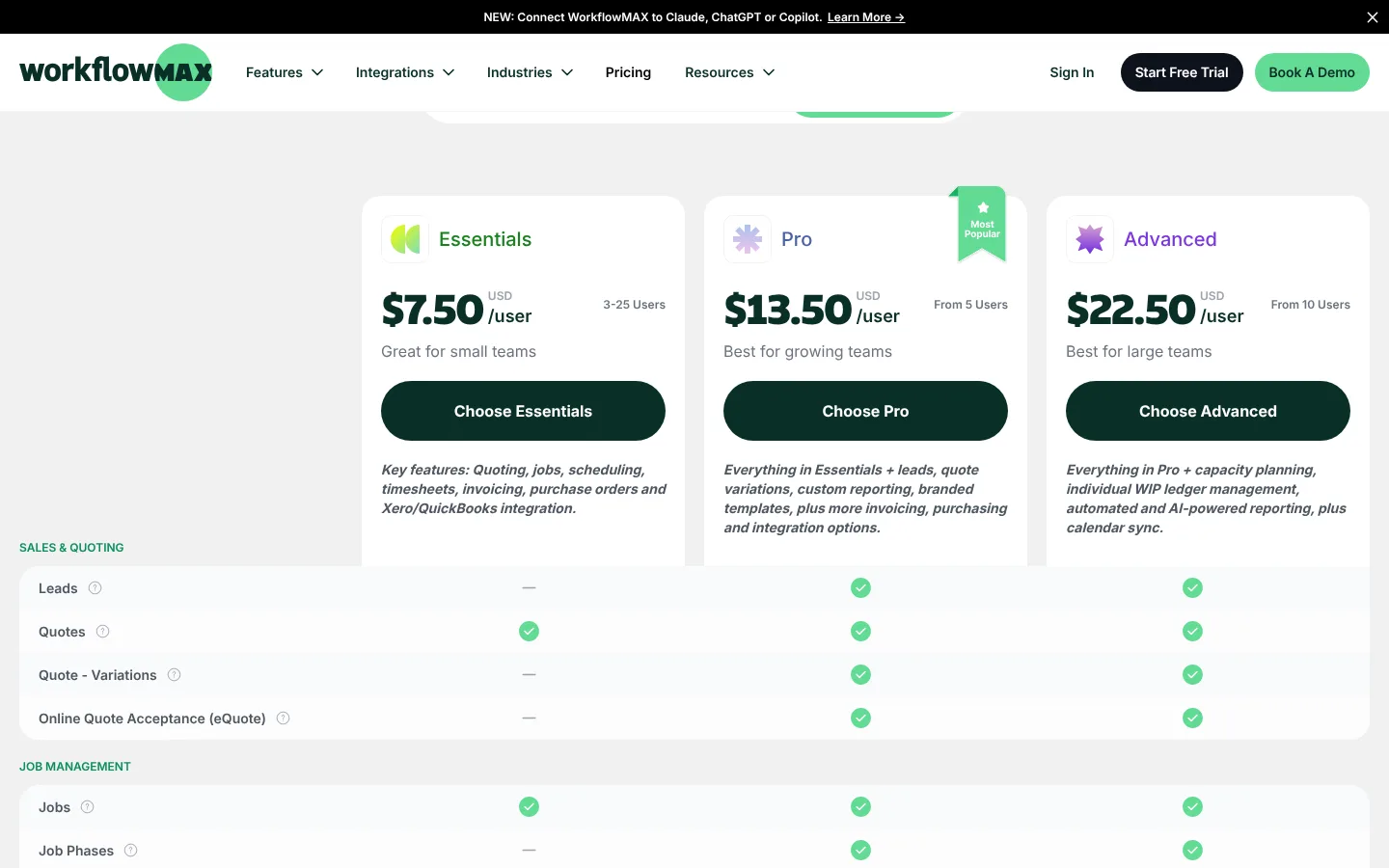
The current WorkflowMax prices each plan per user with a minimum seat count. Essentials covers quoting, jobs, scheduling, timesheets, invoicing, purchase orders and the Xero or QuickBooks integration for 3 to 25 users. Leads, job phases and quote variations start on Pro (from 5 users). Capacity planning and individual WIP ledger management sit on Advanced, which starts at 10 users.
Top pick
1. Pike
Pike fits teams that used WorkflowMax for job costing and invoicing and now want to see margin while the work is still running.
Pike connects projects, tasks, time tracking, resource planning, customers, deals, invoicing and profitability reporting. Each logged hour updates the project’s cost and profit at once. A project manager sees a job going over budget in week two instead of at month-end reconciliation.
If your books live in Xero, Pike sends invoices built from billable time to Xero and syncs customers both ways. QuickBooks Online users can import customers, projects, bills and expenses into Pike, and send invoices from Pike to QuickBooks.
The Pike team maps your current jobs, billing models and reports before go-live, and keeps working with you after launch on rates, write-offs and resourcing.
Best for: Service businesses moving off WorkflowMax that want job costing, resource planning and live project profit in one system, with accounting kept in Xero or QuickBooks.
Pricing: Core $29 per user per month billed yearly ($35 monthly), Growth $49, Scale $99, Enterprise custom. Profitability, deals and full resource management start on Growth.
Compare WorkflowMax’s plan limits with Pike’s on the Pike pricing page.
Why teams switch from WorkflowMax to Pike
| Reason | What it means |
|---|---|
| Margin during the job, not after it | Project cost and profit update as people log time. You can change scope, staffing or rates before the job closes. |
| Resource planning on the same data | Allocations, capacity and time off sit next to the projects they affect. WorkflowMax keeps capacity planning on its Advanced plan. |
| Accounting stays where it is | Invoices built in Pike go to Xero or QuickBooks. Your accountant keeps the ledger they already reconcile. |
| Deals connected to delivery | A won deal becomes a project in the same system, with sales estimates and delivery actuals side by side. |
| Implementation with people, not a help centre | The Pike team sets up your projects, rates and reports with you, and stays involved after launch. |
What WorkflowMax costs
WorkflowMax by BlueRock prices each plan per user per month at a flat rate. Paying quarterly saves 5% and paying yearly saves 10%. Each plan has a minimum user count, and Essentials stops at 25 users. Prices below are in US dollars; the page also lists AUD, NZD, GBP and CAD.
| Plan | Price per user per month | What the plan adds |
|---|---|---|
| Essentials (3 to 25 users) | $7.50 billed yearly, $8.33 billed monthly | Quoting, jobs, scheduling, timesheets, invoicing, purchase orders, Xero or QuickBooks integration |
| Pro (from 5 users) | $13.50 billed yearly, $15.00 billed monthly | Leads, quote variations, online quote acceptance, job phases, custom reporting, branded templates |
| Advanced (from 10 users) | $22.50 billed yearly, $25.00 billed monthly | Capacity planning, individual WIP ledger management, automated and AI-powered reporting, calendar sync |
Prices checked on workflowmax.com/pricing on 2 November 2026. With the minimums, the lowest monthly bill on yearly pricing is $22.50 for Essentials (3 users), $67.50 for Pro (5 users) and $225 for Advanced (10 users). Check the vendor’s page before you buy.

Quick comparison
| Tool | Best for | Key strength | Key difference vs WorkflowMax |
|---|---|---|---|
| Pike | Service businesses that want quotes, jobs, time, invoices and margin in one place | Project profit that updates as time is logged, plus resource planning and deals | Built around live margin per project and per client, not job costing after the fact. |
| Streamtime | Creative studios and in-house creative teams | Job planning, scheduling, quoting, invoicing and WIP reporting | Priced on usage instead of a flat per-user rate, with a creative focus. |
| Productive | Teams that want budgets and resource planning in depth | Budgeting, resource planning, profitability and reporting | Deeper on resourcing than WorkflowMax; rate cards need the Professional plan. |
| Scoro | Firms that want CRM, quoting and delivery in one suite | Quote-to-cash workflow with CRM and financial reporting | Wider scope than WorkflowMax, with a 5-user minimum. |
| BigTime | Billing-led consulting, engineering and accounting firms | Time, expenses, billing and project financials | Closest to WorkflowMax on time-to-invoice, lighter on quoting and leads. |
| Teamwork | Client service teams that run many projects at once | Project delivery, workload planning and client billing | Stronger on task delivery; profitability insights sit on the Optimize plan. |
Streamtime is an Australian job management tool for creative businesses: agencies, in-house creative teams and architects. It covers job planning, scheduling, time tracking, quoting, invoicing, a kanban board, and reports on work in progress, client profitability and team capacity.
For a WorkflowMax customer, Streamtime is one of the closest matches in shape. Both are built around jobs with quotes, timesheets and invoices, and both connect to Xero. Streamtime sends expenses, purchase orders, invoices and credit notes to Xero, and invoices to QuickBooks Online.
The pricing model is the main difference. Streamtime does not publish a per-user price. Its pricing page asks for permanent staff, freelancers per month, annual revenue and the features you plan to use, then quotes one monthly price.
Pricing: No public price list; monthly price quoted from team size, freelancers, revenue and features
Pros
- Job, quote, timesheet and invoice workflow close to what WorkflowMax users know
- Xero integration covers expenses, purchase orders, invoices and credit notes
- Weekly check-ins record how each person’s week went next to hours logged
Cons
- No published price, which makes side-by-side budgeting harder
- Positioned for creative businesses and architects rather than other service firms
Best for: Creative studios that want a job-based workflow similar to WorkflowMax.
Key trade-off: Closest in workflow, but you need a quote before you can compare cost.
Since you're already here, feel free to read the entire Streamtime vs Pike comparison here. We keep it honest.
Productive is software for service businesses covering budgeting, resource planning, projects, time tracking, expenses, reporting and profitability. Resource planning is part of every plan, where WorkflowMax keeps capacity planning on Advanced.
Moving from WorkflowMax to Productive changes the unit of work from the job to the budget. Teams that quote fixed fees and want to watch burn against the quote tend to find that model clear. Teams that mainly need quote, timesheet and invoice may find it more than they use.
Plan gating matters here. Rate cards, billable time approvals and invoicing integrations need Professional. Revenue forecasting and overhead calculation need Ultimate, which is priced on request.
Pricing: Essential $10, Professional $25 per user per month billed yearly ($12 and $29 monthly); Ultimate on request; 3-seat minimum
Pros
- Detailed budgets with burn tracking against estimates
- Resource planning on every plan
- API access on all plans, which helps with data migration
Cons
- Rate cards and invoicing integrations need the Professional plan
- More setup than a quote-timesheet-invoice workflow requires
Best for: Teams that want budget tracking and resource planning deeper than WorkflowMax offers.
Key trade-off: More planning depth than WorkflowMax, at a higher per-user price for the plan most teams need.
Since you're already here, feel free to read the entire Productive vs Pike comparison here. We keep it honest.
Scoro covers CRM, quoting, projects, resource planning, time tracking, invoicing and financial reporting. It suits firms whose WorkflowMax setup leaned on leads and quotes, and who now want the sales pipeline and delivery in one system.
Scoro sells combinations of modules rather than fixed plans. Each combination needs at least five users, which puts a higher floor under the monthly cost than WorkflowMax Essentials.
Plan the setup time. Scoro’s range means more configuration and more decisions about how quotes, budgets and invoices connect before the system matches your process.
Pricing: Combinations from €15 per user per month; end-to-end combination €52 per user per month; 5-user minimum
Pros
- Quote-to-invoice workflow with CRM in the same system
- Financial reporting across projects, clients and the whole business
- Retainers and recurring work supported
Cons
- 5-user minimum on every combination
- Longer setup than WorkflowMax
Best for: Firms that want sales, quoting and delivery in one suite and have time to configure it.
Key trade-off: Wider than WorkflowMax, with more setup and a higher seat floor.
Since you're already here, feel free to read the entire Scoro vs Pike comparison here. We keep it honest.
BigTime
BigTime is a professional services tool built around time, expenses, billing and project financials. Its customers include consulting, engineering, architecture and accounting firms that bill time and materials.
For WorkflowMax users whose main use was turning timesheets into invoices, BigTime covers that core well and connects to QuickBooks. It has less around leads and quoting than WorkflowMax Pro.
Look at BigTime if billing accuracy matters more to you than the sales side of the job.
Pricing: Essentials from $20 per user per month
Pros
- Detailed time and expense capture for billing
- Project financial reporting for time and materials work
- QuickBooks integration
Cons
- Less coverage of leads and quoting than WorkflowMax Pro
- Resource planning is less central to the product
Best for: Billing-led firms that used WorkflowMax mainly to go from timesheet to invoice.
Key trade-off: Strong on billing, lighter on the front end of the job.
Teamwork is project management software for client work, covering tasks, time tracking, workload planning, budgets and invoices from logged time.
Compared with WorkflowMax, Teamwork puts more weight on task-level delivery and client collaboration, and less on job costing. Quotes are not part of the entry plans.
Time budgets, retainers and invoices from logged time start on Accelerate. Profitability insights, quotes and multi-currency budgets sit on Optimize, priced on request.
Pricing: Basics $9.99 per user per month billed yearly; Accelerate $24.99; Optimize on request
Pros
- Task management and client collaboration at the centre of the product
- Workload and capacity views on Accelerate
- Invoices created from tracked time
Cons
- Quotes and profitability insights need the Optimize plan
- Less job-costing detail than WorkflowMax
Best for: Delivery-heavy teams that care more about tasks and client collaboration than job costing.
Key trade-off: Better task delivery than WorkflowMax; profitability sits on the top plan.
Since you're already here, feel free to read the entire Teamwork vs Pike comparison here. We keep it honest.
Moving from WorkflowMax to Pike
Decide what has to move and what can stay archived. Most teams bring clients, active jobs, staff with their cost and charge rates, and open quotes. Closed jobs often stay in a WorkflowMax export for reference. WorkflowMax lists a public API, which helps if you want history moved in bulk.
In Pike, jobs become projects under their customer, job tasks become tasks, and staff become members with cost and billing rates. Pike imports customers, projects, tasks, members, teams, deals and historical time entries from CSV templates, in an order that keeps those links intact.
Connect Xero or QuickBooks before the first invoice run, and check that customers match on both sides. Then run one billing cycle for a few live clients in Pike and compare the invoices with what WorkflowMax would have produced. When they match, move the rest of the team.
When to stay with WorkflowMax
Stay with WorkflowMax if your team already moved to the BlueRock version, your quotes, timesheets and invoices run cleanly, and you rarely need margin before a job closes. A second migration in two years costs your team time it could spend on client work.
WorkflowMax also fits if you depend on its Xero Payroll timesheet export in Australia or New Zealand, or if your business is small enough to stay inside the Essentials plan at 3 to 25 users.
How to choose a WorkflowMax alternative
List what WorkflowMax did for you day to day: quoting, job costing, timesheets, invoicing, purchase orders, leads. Then list what you worked around in spreadsheets, such as capacity, margin by client or forecasting. The second list tells you what to buy.
If you want the same job workflow for a creative team, look at Streamtime. If budgets and resourcing were the gap, Productive goes deeper. If you need CRM and quoting in the same suite, Scoro covers that. If billing is the whole job, BigTime is focused on it. If delivery and client collaboration matter most, Teamwork fits.
If you want quotes, time, resourcing and live project margin in one system, with Xero or QuickBooks kept as the ledger, Pike is built for that.
Run one real billing cycle in any tool you shortlist. An invoice that matches what your client expects tells you more than a feature list.
FAQ
See Pike with your own jobs
Bring a typical WorkflowMax job, with its quote, timesheets and invoice, to a 30-minute demo. We will show you how it looks in Pike, including margin while the job is running.

Your business runs better on Pike.
 ISO 27001
 GDPR
 SOC 2 Type II
Built to keep sensitive client data secure and private.