


How to build an agency rate card and keep it current
 Ethan Novak

By Andre Thompson
Content Writer at Pike
Share

A client replies to an invoice asking why a junior designer is billed at the senior rate, and why there are 14 hours for a workshop they thought was included. The finance lead spends a morning rebuilding the invoice from timesheets. The corrected version goes out a week later, and payment arrives three weeks after it should have. Every error on that invoice was visible in the agency's own data before it was sent.
This guide covers the review step that sits between logged hours and a sent invoice: what it catches, the checklist to run, who signs off, and how to fit it into the billing cycle.
An invoice review checks logged time and costs against what the client agreed to pay for. Time tracking records what happened. The review asks whether each hour was approved, priced at the agreed rate, inside the agreed scope, and matched by every cost that should be billed with it.
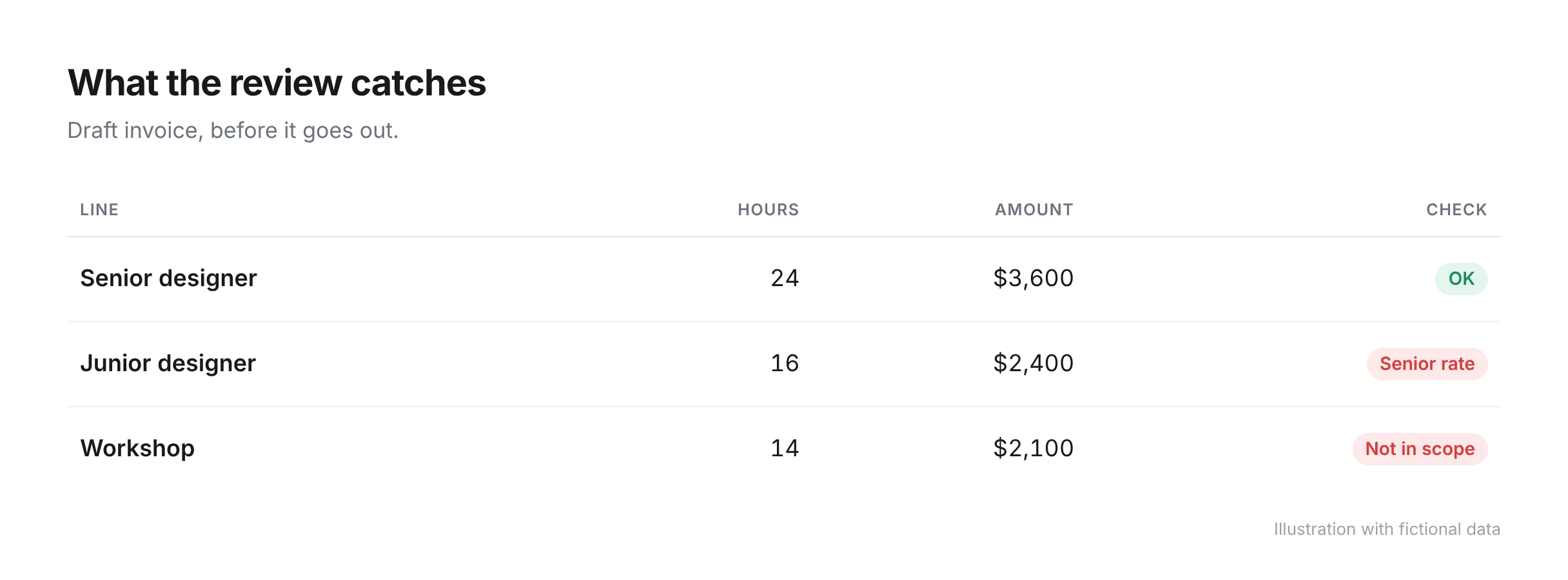
Time tracking tools, including automated ones, answer "how many hours did we work". Our guide to timesheet automation covers capture in detail. Complete timesheets can still produce a wrong invoice, because billing errors come from the comparison between the timesheets and the contract:
Billing errors run in both directions. Overbilling leads to disputes, credit notes, and late payment. Underbilling is quieter, since no client complains about being charged too little, and the agency absorbs the difference. Our guide to revenue leakage covers where underbilled work comes from.
A useful invoice review runs seven checks. Each one compares the draft invoice with a source the agency already has, and each has one person who signs it off.
| Check | What it catches | Who signs off |
|---|---|---|
| Time is approved | Hours billed that no project lead has reviewed, including duplicates | Project lead |
| Hours are on the right project | Time logged to the wrong client, project, or phase | Project lead |
| Billable status is correct | Billable work marked non-billable, and internal time marked billable | Project lead |
| Rates match the agreement | A role billed at the wrong rate, or an outdated client rate | Finance |
| Scope is covered | Work outside the statement of work with no change order behind it | Account lead |
| Third-party costs are included | Supplier invoices, media, and expenses missing from the invoice | Finance, confirmed by project lead |
| Invoice matches billing terms | Fixed-fee milestones billed early or late, retainer overages, wrong PO | Finance |
Every billable hour on the invoice should have been approved by the person who runs the project. Approval is where a project lead notices a 12-hour entry that should have been 1.2, the same day logged twice, or time on a task that finished last month. An approval workflow that locks approved entries also stops them from changing after the review.
Each line should use the rate agreed for that client and role. Rate errors usually come from a client-specific rate card that was not applied, a rate increase that reached the contract and never reached the billing system, or a person whose role changed mid-project. Compare the rates on the draft with the signed agreement.
Hours for work outside the statement of work need a signed change order before they are invoiced. If out-of-scope hours are on the draft with no change order, there are two honest options: get the change approved now and bill it, or write the hours off as a deliberate decision. Our guide to change order management covers how to raise one without damaging the client relationship. Billing the hours and hoping the client does not ask is the option that produces disputes.
Every supplier cost the agency paid for the client should appear on the invoice in the form the contract describes. Some contracts bill third-party costs at the amount paid, as a pass-through cost. Others allow a markup. The usual failure is a supplier invoice that was paid and never linked to the project, so it never reaches the client's invoice.
The invoice total should match what the billing model allows at this point in the project. On a fixed fee, check that the milestone being billed has been delivered. On a retainer, compare hours used with hours included and apply the agreed treatment for the difference. On capped time and materials, check the running total against the cap. Our guide to agency billing models explains how each structure sets what can be invoiced. Check the purchase order number and billing contact at the same time, since a wrong PO is a common reason an otherwise correct invoice is rejected.
Three people sign off an invoice, and each checks the part they have the knowledge to check. The project lead confirms the work. The account lead confirms the commercial agreement. Finance confirms the numbers.
One rule keeps the review meaningful: the person who logged the time does not approve their own time. At a small agency where the project lead also does delivery work, a second person approves that lead's hours.
Set a threshold for a second look. For example, any invoice more than 15% above the previous month for the same client, or any invoice with a write-off above a set amount, goes to a partner or director before it is sent. The threshold is a choice for each agency. The point of it is that large surprises get a second reader.
The review works when its checks are spread across the month and the final review is a short confirmation. If all seven checks happen on the last working day, they get rushed or skipped. The checks that depend on memory, such as whether a client approved extra work, are the ones that fail.
A monthly billing cycle with the checks spread out looks like this:
| When | What happens | Owner |
|---|---|---|
| Every week | Time is submitted and approved, with corrections made while they are fresh | Project lead |
| When scope changes | A change order is raised and signed before the work starts | Account lead |
| When a supplier invoice arrives | The cost is attached to the project and marked billable or not | Finance |
| Three working days before billing | Draft invoices are generated and scope is confirmed | Account lead |
| Billing day | Rates, costs, terms, and totals are checked and the invoice is sent | Finance |
With weekly approval, the month-end review starts from hours that have already been checked. Finance looks at rates and terms and does not need to ask anyone what an entry from three weeks ago was for.
Keep a record of the errors the review finds. If the same error appears each month, such as one client's rates being wrong or one team's time arriving unapproved, fix its cause. Approved hours that are waiting to be invoiced are work in progress, and our guide to WIP and unbilled revenue covers how to track that balance between billing runs.
Pike has approval flows for time entries and for expenses, so hours and costs are reviewed before they reach an invoice. Every tracked hour is priced into the project's financials using the project's rates, and billable entries, rates, and project rules are connected when an invoice is prepared. Pike supports 4 billing models (fixed-price, time-and-materials, capped T&M, and retainer) and syncs invoices with QuickBooks, Xero, Business Central, and e-conomic.
The finance feature page shows how approved time becomes an invoice, and pricing lists which plans include approval flows. To see unapproved time and unbilled costs on your own projects before the next billing run, book a 15-minute walkthrough.
Share
 ISO 27001
 GDPR
 SOC 2 Type II
Built to keep sensitive client data secure and private.