


Agency invoice review: catch billing errors before sending
 Andre Thompson
By Andre Thompson
Content Writer at Pike
Share

A designer on a 40-hour contract does not have 2,080 billable hours a year. Once you take out public holidays, vacation, sick days, training and the internal meetings every team runs, the real number for most roles is a long way below that. A revenue plan built on 2,080 hours per person is wrong before the year starts.
Billable hours per employee is the number of hours one person can realistically bill to clients in a year. You calculate it in three steps: start from contracted hours, subtract the hours the person is not at work, then apply a billable target for their role to the hours that remain.
This guide works through that calculation with real numbers, shows how targets differ by role, and covers how to compare each person's target with what they log.
The formula is available hours multiplied by the billable target for the role. Available hours are contracted hours minus leave and public holidays.
Billable hours per employee = (contracted hours − leave − public holidays) × billable target
The billable target is a percentage your business sets for each role. It is the share of a person's available time you expect to go on client work, after internal meetings, training, sales support and admin.
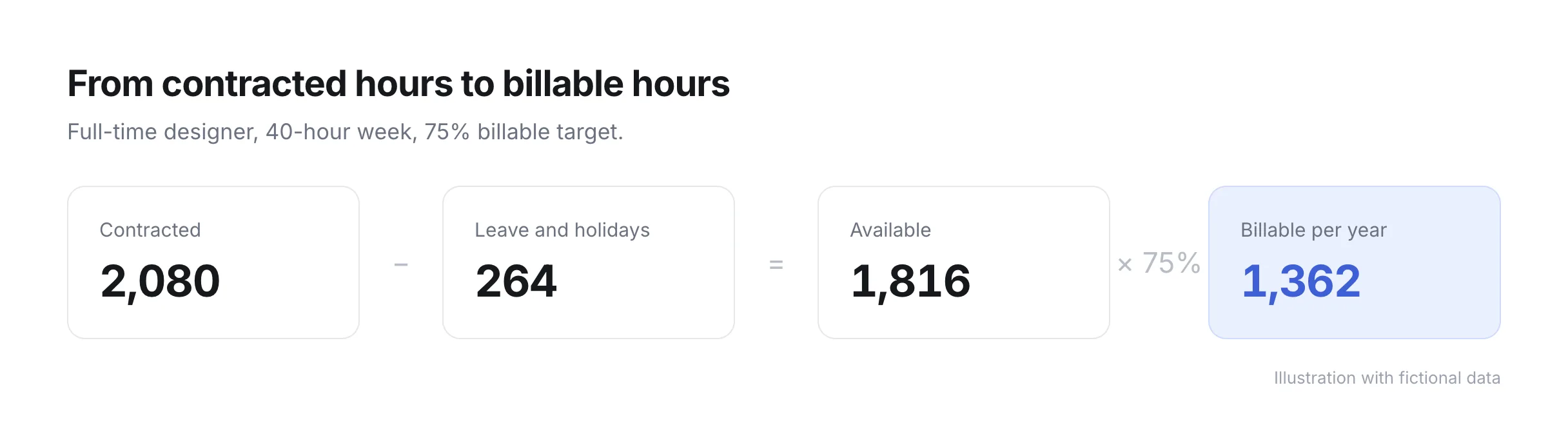
Contracted hours are the hours in the employment contract, multiplied out to a year. A 40-hour week gives 2,080 hours (40 × 52). A 37.5-hour week gives 1,950.
Use the contract, not the hours people tend to work. If your plan only adds up when people work evenings, you have a staffing problem, and you want to see it in this calculation.
Subtract every hour the person is paid but not at work. For a full-time employee in the example below:
| Item | Days | Hours |
|---|---|---|
| Public holidays | 8 | 64 |
| Vacation | 20 | 160 |
| Sick leave allowance | 5 | 40 |
| Total | 33 | 264 |
That leaves 2,080 − 264 = 1,816 available hours, or about 45 working weeks of 40 hours.
Use your own numbers here. Holiday entitlement depends on the country and the contract, and sick leave is an estimate. A reasonable starting point for sick leave is last year's actual average across the team.
Multiply available hours by the billable target for the person's role. Roles with more client time get a higher target. Roles that also run the business, sell or manage people get a lower one.
Here is how the same 1,816 available hours turn into different billable numbers in one example business:
| Role | Billable target | Billable hours per year | Per working week |
|---|---|---|---|
| Designer | 75% | 1,362 | 30 |
| Developer | 80% | 1,453 | 32 |
| Project manager | 60% | 1,090 | 24 |
| Account director | 50% | 908 | 20 |
The targets in this table are an example, not a benchmark. Set yours from your own logged time: look at what each role billed last year in a good month, and set the target at a level the team can hold for twelve months, not one.
People relate to the "per working week" column. A designer cannot do much with a yearly target of 1,362 hours. A target of 30 billable hours in a normal working week is something they can check every Friday.
A target is only useful when you compare it with logged time every week. Compare billable hours logged with the weekly target for each person, and look at the trend over four to six weeks rather than one week.
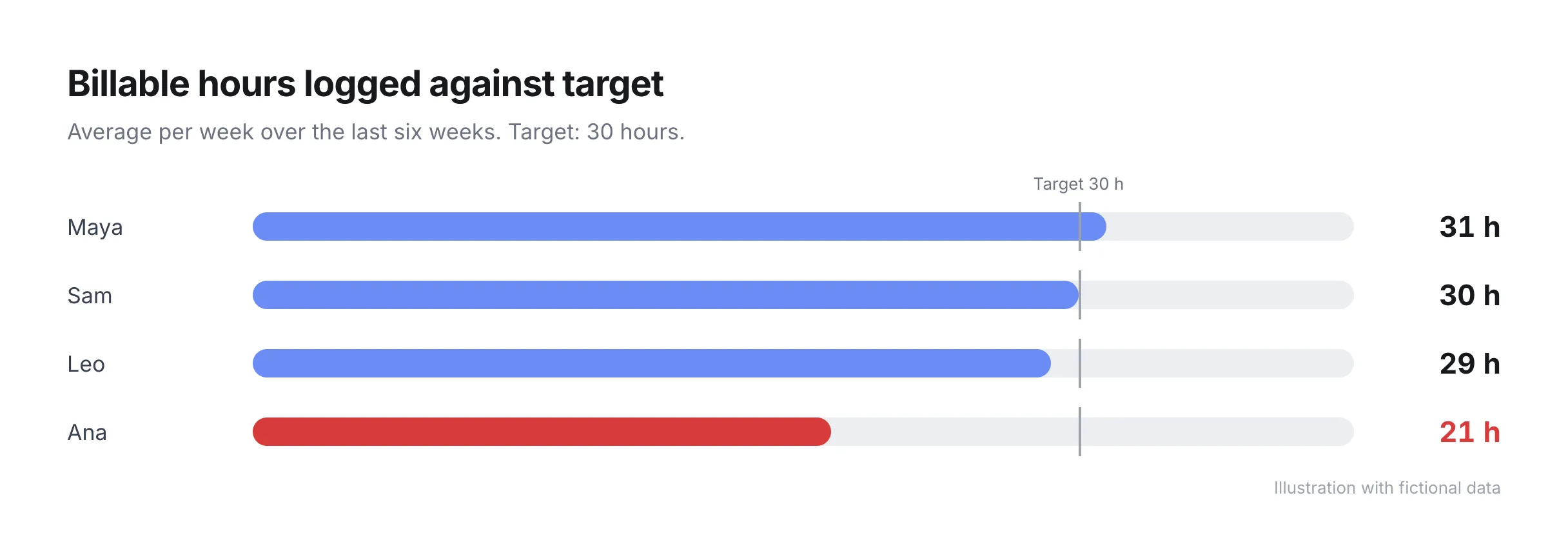
A gap for one person usually has one of three causes:
When the whole team is short, look at the pipeline first. Sales has usually not kept up with headcount.
Multiply billable hours by the billing rate to see how much revenue each person can generate in a year. Using the example above, a designer with 1,362 billable hours at $130 an hour can generate $177,060 a year if every billable hour is invoiced at full rate.
In practice, some billable hours are written off or discounted. The share of billable hours that actually reaches an invoice is the realization rate, and it is worth tracking next to billable hours. The guide on utilization vs realization rate covers how the two work together.
Add up the revenue capacity for everyone on the team and you have the ceiling for what your business can bill with its current headcount. If the sales plan for next year is above that ceiling, you need more people, higher rates, or a different mix of work, and it is better to find that out in the budget than in October.
Billable hours per employee is a number of hours. Billable utilization rate is a percentage: billable hours divided by available hours. The two describe the same thing from different angles.
| Measure | Example | Best for |
|---|---|---|
| Billable hours per employee | 1,362 hours a year, 30 a week | Revenue plans, individual weekly targets |
| Billable utilization rate | 75% | Comparing roles and teams of different sizes |
Use hours when you plan revenue and talk to individuals. Use the percentage when you compare teams. The guide on billable utilization rate covers the percentage in detail, and the free utilization calculator calculates both from your own inputs.
Pike calculates capacity from each person's contracted hours and takes approved and pending time off out automatically, and you get available hours without a spreadsheet. Time logged against projects is marked billable or non-billable, and the time tracking features show billable hours per person next to their capacity.
See billable hours and utilization update as your team logs time: book a 15-minute walkthrough.
It depends on the role and on how much leave your business gives. For a full-time employee with 1,816 available hours, a 75% target gives 1,362 billable hours a year and a 50% target gives 908. Calculate available hours from your own contracts first, then set a target per role.
Take contracted hours for the year, subtract public holidays, vacation and an allowance for sick leave, then multiply by the billable target for the role. For example, (2,080 − 264) × 75% = 1,362 billable hours.
No. People who also manage, sell or run internal work have less time for client work, and their target should be lower. With a single target for everyone, senior people either log internal work as billable or look like they are underperforming.
On a 40-hour contract with 264 hours of leave and holidays, 75% utilization is 1,362 billable hours a year, or about 30 hours in a normal working week. On a 37.5-hour contract with the same leave in days, it is about 1,277 hours a year.
Billable hours are hours spent on work a client can be charged for. Billed hours are the hours that end up on an invoice. The gap between the two comes from write-offs, discounts and hours nobody invoiced, and the ratio between them is the realization rate.
Share
 ISO 27001
 GDPR
 SOC 2 Type II
Built to keep sensitive client data secure and private.