


Agency invoice review process
 Andre Thompson

By Ethan Novak
Content Writer at Pike
Share

An agency quotes a senior designer at $120 an hour because that was the rate in 2023. Salaries have gone up twice since then, the designer now costs $78 an hour to employ, and every project staffed with that role earns less than the estimate said it would. Nobody decided to lower the margin. The rate card just stayed the same while the costs under it changed.
This guide covers how to build a rate card from your own costs, how to structure it, how to price a project from it, and how to keep it from going stale.
An agency rate card is a document that lists the hourly or daily rate you charge for each role or seniority level. Estimates, proposals, retainers, and change orders all take their prices from it. The rate card glossary entry has the short definition.
A rate card does three jobs:
Agencies without a rate card usually price from memory or from the last similar project. That works until staff costs change, a new role is added, or a second person starts writing proposals.
Set each rate from the cost of the role and the margin you need, then compare it with what the market pays. Three inputs are needed for each role:
Loaded cost divided by billable hours gives the cost per billable hour. Dividing that by one minus the target margin gives the rate.
For example, a mid-level designer has a loaded cost of $91,000 a year and is expected to bill 1,400 hours. The cost per billable hour is $65. With a target gross margin of 50%, the rate is $65 divided by 0.5, which is $130 an hour.
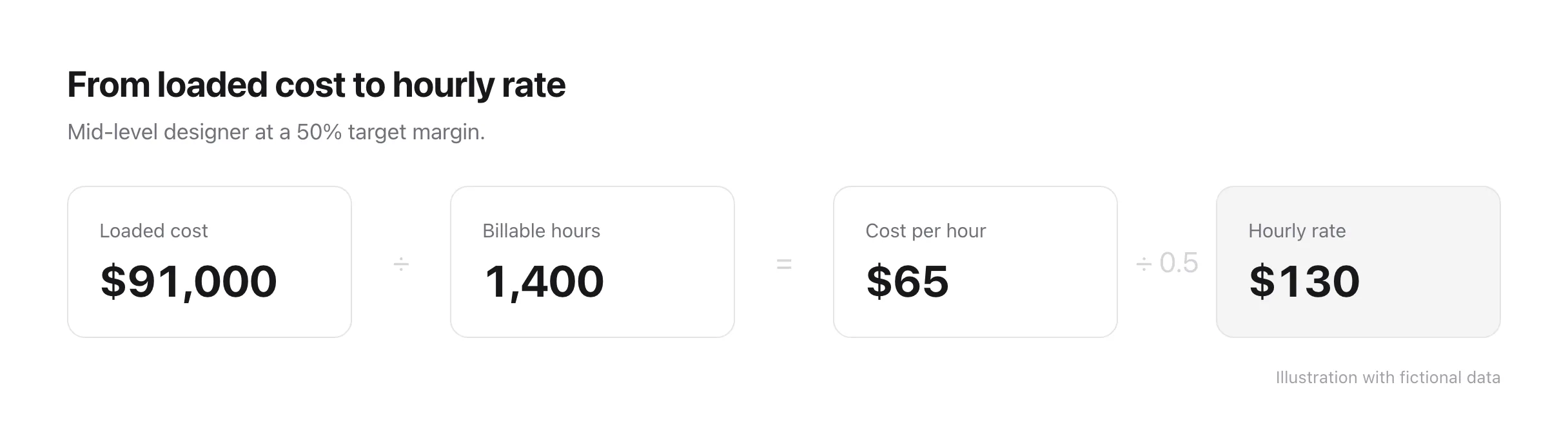
The step agencies most often skip is using billable hours in the calculation. Dividing the loaded cost by 2,080 contracted hours gives $44 an hour, and a rate built on that figure assumes the designer bills every hour of the year. The effective hourly rate guide shows how to check what a role earns per hour once write-offs and unbilled time are included.
After the cost-based rate is calculated, compare it with what clients in your market pay for the role. If the market rate is higher, charge the market rate and keep the extra margin. If the market rate is lower than your cost-based rate, the role is too expensive for the work you sell, the utilization target is too low, or the service is underpriced in your market. The comparison shows you that before a client does.
Most agencies list rates by role and seniority, because that matches how projects are staffed and how time is tracked. The three common structures suit different agencies.
| Rate card type | What it lists | Best for | Tradeoff |
|---|---|---|---|
| Role and seniority | One rate per role and level, such as senior designer | Agencies that staff projects with a changing mix of roles | More lines to maintain, and clients can question individual rates |
| Blended | One rate for any hour, whoever does the work | Small teams and retainers with a stable staffing mix | Margin falls when senior people do more of the work than planned |
| Service or deliverable | A price per unit of output, such as a landing page | Productized services with repeatable scope | Needs accurate internal estimates, since overruns are not billable |
| Client-specific | A copy of the standard card with agreed discounts | Large or long-term clients with negotiated terms | Every extra card has to be updated at each review |
Keep the number of lines small, with one line for each role and level you sell. A card with thirty lines gets ignored in favor of whichever rate the estimator remembers.
Use the same role names on the rate card as in your time tracking. If the card says "senior designer" and timesheets say "design lead", someone has to translate between the two for every invoice.
A blended rate charges one price for every hour, and role-specific rates charge a different price for each role. Role-specific rates keep the margin stable when the staffing mix changes. A blended rate is simpler for the client to read.
A blended rate is the weighted average of the role rates for the mix of people you expect on the work. If a retainer is planned as 20 hours of a senior consultant at $160 and 60 hours of a consultant at $110, the blended rate is $9,800 divided by 80 hours, or $122.50.
The risk is in the mix. If the senior consultant ends up doing 40 of the 80 hours, the client still pays $122.50 for hours that cost you more to deliver, and the margin drops while the invoice stays the same. A blended rate works when you can control who does the work. The blended rate glossary entry covers the formula in more detail.
Many agencies use both. The internal card is role-specific, and proposals show a blended rate calculated from it for the planned staffing. That keeps the client-facing price simple while margin is still tracked per role.
To price a project from the rate card, estimate hours per role and multiply each by its rate. The total is the fee before any discount, contingency, or pass-through cost.
For example, a website project is estimated at:
| Role | Hours | Rate | Fee |
|---|---|---|---|
| Strategy lead | 20 | $180 | $3,600 |
| Senior designer | 60 | $150 | $9,000 |
| Developer | 110 | $140 | $15,400 |
| Project manager | 30 | $120 | $3,600 |
| Total | 220 | $31,600 |
The same card applies whichever billing model you use. On time and materials, the client pays the rates for hours worked. On a fixed fee, the $31,600 becomes the price and the hours become your internal budget. On a retainer, the rates set how many hours the monthly fee buys. Our guide to agency billing models compares those structures.
Record any discount as a separate line on the estimate and leave the rates unchanged. A project sold at 10% off the card is a known decision with a known cost. A project priced with quietly lowered rates looks like a normal project in every report and earns less.
Review the rate card once a year on a fixed date, and again whenever staff costs change by more than a few percent. An annual review checks four things:
Tell existing clients about new rates in writing before they take effect. Most contracts set a notice period for rate changes. Clients on a client-specific card need their own updated version.
Apply new rates to new estimates from the effective date. Work already agreed keeps the rates it was sold at unless the contract says otherwise.
Pike keeps rates and roles on each project and prices every tracked hour into the project's financials. Budgets, invoices, and margin views use the same rates, so the hours on the timesheet and the amount on the invoice come from one source. Pike supports 4 billing models (fixed-price, time-and-materials, capped T&M, and retainer), so the same rates apply across each of them.
The finance feature page shows how rates, costs, and invoicing connect in Pike, and pricing lists what each plan includes. To see the margin each role on your rate card earns on live projects, book a 15-minute walkthrough.
Share
More in the same topic
 ISO 27001
 GDPR
 SOC 2 Type II
Built to keep sensitive client data secure and private.