


Handling unplanned work without blowing up the schedule
 Clara Jensen
By Clara Jensen
Content Writer at Pike
Share

A project ends on Friday. On Monday, three of the people who worked on it have nothing assigned. One picks up some internal work, one helps on a pitch, and one waits. The next project that needs them starts in three weeks. Nobody planned those three weeks, and nobody will see what they cost until utilization is reported at the end of the month.
This guide covers how to put a number on bench time, how to see it before it starts, and what to do about it. For the definition and formula, see the bench time glossary entry.
Bench time is the paid hours a billable person has with no client work assigned, and a small planned amount of it is useful. A team with every hour allocated has no room for an urgent client request, a pitch, training, or the gap between one project ending and the next starting.
You can tell useful bench time from the costly kind with three questions:
The aim is to keep bench time small and deliberate, and to know its cost when it is neither.
An unassigned billable person costs your business twice: the salary is still paid, and the revenue those hours would have earned is missing. Both figures are easy to calculate per role per week.
The table uses illustrative numbers for a 40-hour week. Replace them with your own loaded costs and rates.
| Role level | Loaded cost per week | Billing rate | Revenue lost per idle week | Break-even utilization |
|---|---|---|---|---|
| Junior | $1,400 | $100 | $4,000 | 35% |
| Mid-level | $2,000 | $140 | $5,600 | 36% |
| Senior | $2,900 | $190 | $7,600 | 38% |
Loaded cost is salary plus employer taxes and benefits. Revenue lost is the billing rate multiplied by 40 hours. Break-even utilization is the share of the week the person has to bill for their own cost to be covered: loaded cost divided by the revenue of a fully billed week. For the mid-level role, $2,000 divided by $5,600 is 36%, or about 14 billable hours.
That break-even figure covers the person's direct cost only. Rent, software, management, and sales time also have to be paid from billable hours, which means the utilization your business needs to stay profitable is well above it. Our guide to billable utilization rate covers how to set that target per role.
Use the weekly figure when you ask for a decision. Nobody acts on "utilization was 68% last month". People do act on "two mid-level developers unassigned for three weeks is $12,000 in salary and $33,600 in revenue we did not bill".
You can see bench time in the allocation plan weeks before it happens. Reported utilization shows it after the month has closed, when the hours are already gone.
Three signals show bench time while there is still time to act:
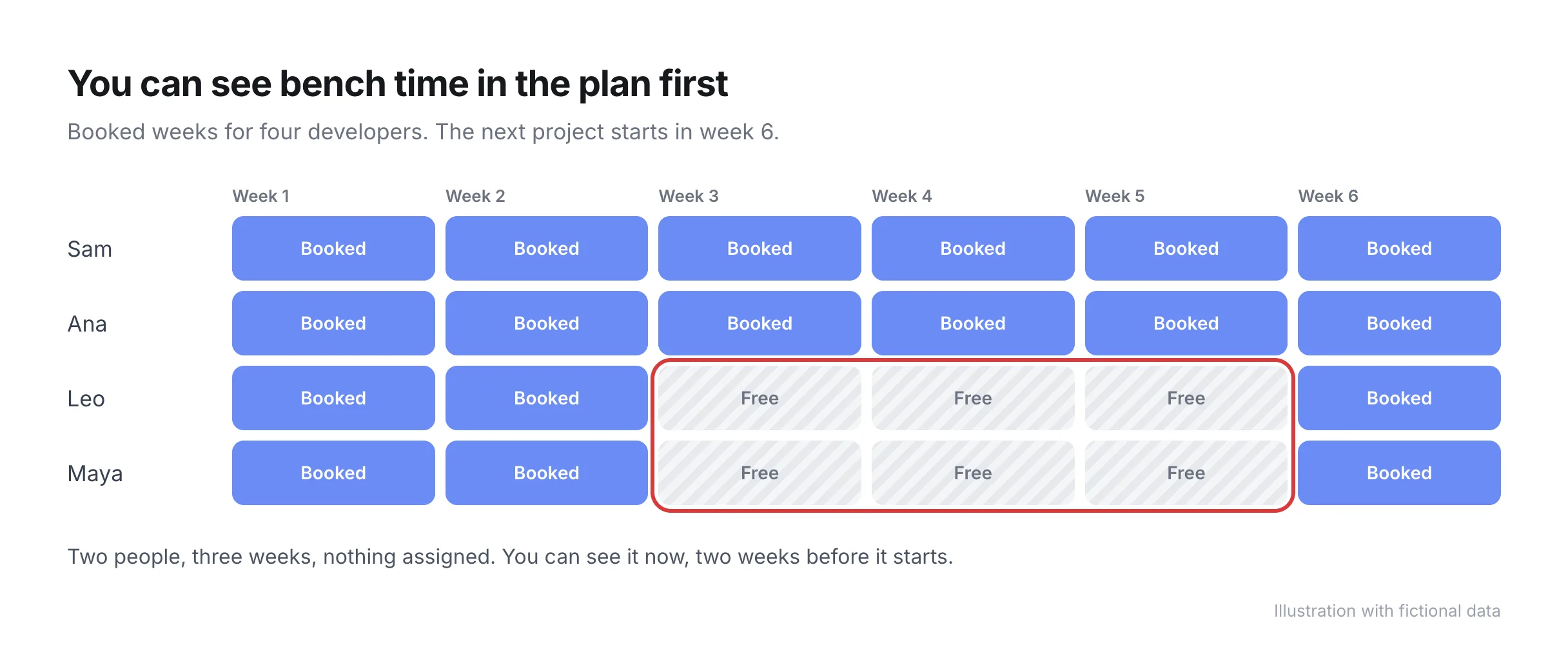
Review these weekly, in the same meeting where over-allocation is checked. The two problems are found in the same data: one is a person with more hours booked than available, and the other is a person with far fewer. Our guide to resource forecasting for agencies covers how to build the forward view.
You have six ways to reduce bench time, and the order to try them in depends on how long the gap will last. For short gaps, find work that is ready to start. For long gaps, change supply or demand.
Pulling work forward and reallocating are the only two that recover revenue. The other four put unbilled time to good use, which is worth doing, but do not report it as solved bench time.
Bench time is a sales problem when demand for a role is too low across the whole team for several weeks. It is a resourcing problem when the work exists and the wrong people are assigned to it. You need to tell the two apart before choosing a fix.
| Cause of bench time | Resourcing fix or sales fix | The lever to pull |
|---|---|---|
| Gap between one project ending and the next | Resourcing | Pull the next project's start forward, or fill with backlog |
| A project is delayed by the client | Resourcing | Reallocate to other live work until the client is ready |
| One team is idle while another is overloaded | Resourcing | Reallocate across teams and review who owns staffing |
| Freelancers hold work that employees could do | Resourcing | Move the work to employees at the next handover |
| A whole role is under-booked for a month or more | Sales | Sell work that uses that role, or retrain and freeze hiring |
| Pipeline is thin for the next quarter | Sales | Raise it with sales now, and plan internal work for the gap |
| Deals close later than forecast | Sales | Use weighted pipeline dates in the plan and hold start dates loosely |
| Headcount was added ahead of signed work | Both | Tie future hires to signed or high-probability work |
A quick test: if other people in the same role are overloaded while one is idle, the problem is resourcing. If everyone in the role has spare hours, your business has more capacity in that role than it is selling.
When the cause is sales, reshuffling people only moves the idle hours from one person to another. The resourcing lead's job at that point is to give sales a specific figure, for example "we have 240 unassigned developer hours in November". Sales can act on a number like that. Our guide to resource capacity planning covers how to weight the pipeline when planning demand.
Pike shows each person's allocated hours against their available hours across every project, for the coming days or the year ahead. An under-booked week is visible in the same view as an overloaded one, and allocations can be changed from that view. Utilization is reported by project, team, or person, which lets you tell a role that is under-booked as a whole from one person with a gap.
The resource management feature page shows the allocation and capacity views, pricing lists what each plan includes, and the resourcing and capacity planning guide covers the wider process. To see who on your team is unassigned over the next eight weeks, book a 15-minute walkthrough.
Share
 ISO 27001
 GDPR
 SOC 2 Type II
Built to keep sensitive client data secure and private.