


Bench time: what it costs your business and how to reduce it
 Clara Jensen
By Clara Jensen
Content Writer at Pike
Share

A client calls on Tuesday morning because their checkout page is broken. The developer who can fix it is booked at 40 hours this week across two other projects. The fix takes six hours, the other two projects each lose three, and by Friday three clients have a reason to be unhappy. Most agencies treat that week as bad luck. It happens often enough that it should be in the plan.
This guide covers the process for absorbing unplanned work: how to measure it, how much capacity to hold back for it, how to decide which requests interrupt planned work, and how to reschedule the work that gets pushed.
Unplanned work is any task that arrives after the week's plan is set and has to start before the next planning cycle. The usual sources at an agency are urgent client requests, production incidents on something already delivered, rework after late feedback, and cover for a colleague who is off sick.
A forecasting miss is a different problem. If a project was always going to need 60 design hours and the plan said 40, the work was knowable in advance and the estimate was wrong. Better estimating and a better resource forecast fix that. Unplanned work is work that could not have been named in advance. You can predict how much of it will arrive in a typical week. You cannot predict which client it will come from or what it will be.
That difference decides the fix. You correct a forecasting miss by improving the estimate for a specific project. You handle unplanned work by reserving capacity that is assigned to nothing in particular. The unplanned work glossary entry has the short definition.
Unplanned work lands on a specific person, and it lands on the people who are already the most booked. The developer who built the client's site is the one who gets the call when it breaks. The account lead who knows the client gets the urgent request. Those people tend to be senior and fully allocated.
When a plan has every hour assigned, an interruption has only three places to go. It can displace planned work, which then runs late. It can go into overtime, which works for a week and stops working after a month. Or it can be done fast and badly, which creates rework and more interruptions later.
A plan with every person at 100% assumes no interruptions will arrive. If your time entries show that six hours of interruptions arrive per person every week, that plan is wrong before Monday starts.
Measure unplanned work from time entries before you decide how much capacity to reserve for it. The method takes about a month of data:
Do this per role. A support-heavy development team may lose 20% of its week to incidents while the strategy team loses 5%. One agency-wide percentage hides that.
For example, a four-person development team has 160 available hours a week. Over six weeks they log 24, 31, 18, 40, 22, and 27 hours of unplanned work. The average is 27 hours a week, or about 17% of the team's available hours. That figure is the starting point for the buffer.
A capacity buffer is a share of each person's available hours that stays unallocated so interruptions have somewhere to go. Set it from the measured figure for the role, and build it into the plan as a rule that applies every week.
In practice the buffer is a lower allocation ceiling. If the development team loses 17% of its hours to unplanned work, plan that team to roughly 80% to 85% of available hours and leave the rest open. A developer with 40 available hours gets 32 to 34 hours of planned project work. When the Tuesday incident arrives, the six hours come out of the open time and the two other projects keep their dates.
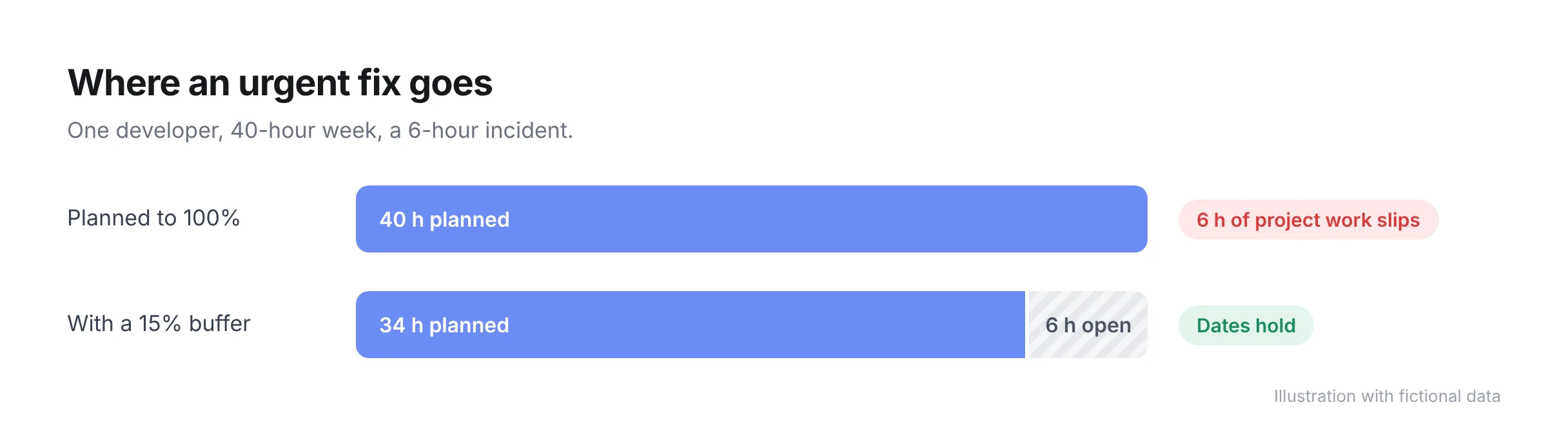
Three details make the buffer hold:
A buffer lowers planned utilization. An agency that planned to 100% and delivered 83% was already paying for the buffer in late projects and overtime. Planning to 83% makes the number in the plan match the number in the timesheets. Our guide to resource capacity planning covers how to set utilization targets with this kind of allowance included.
Most urgent requests can wait until the next planning cycle, and a short set of written rules is enough to tell which ones cannot. Without rules, the person who received the request decides alone, and the request from the most insistent client goes first.
A workable triage asks three questions about every request that arrives mid-week:
One person should own triage for each team, usually whoever runs resourcing or delivery. Requests go to that person first. They decide whether the request uses the buffer, waits for the next cycle, or needs a commercial conversation, and they tell the client the same day.
| Unplanned work type | Typical cause | How to buffer for it |
|---|---|---|
| Production incident on delivered work | A bug, an outage, or a third-party change | Reserve hours for the roles that support live client work |
| Urgent client request inside scope | A client deadline moved or a stakeholder changed | Per-role buffer, used after triage confirms the date is fixed |
| Urgent client request outside scope | New work arriving as a favor or a quick ask | No buffer; route to a change order and schedule it as new work |
| Rework after late feedback | Review rounds that run past the planned date | Plan a feedback window per milestone and hold hours after it |
| Cover for sickness or unplanned absence | A colleague is out and their deadlines do not move | Team-level buffer, plus a named second person on each project |
| Internal emergencies | A pitch, a hiring round, or an escalation | Count them in the measurement so the buffer reflects them |
When an interruption is larger than the buffer, the displaced work needs a new date on the same day. The common failure is that the urgent task gets done and the plan keeps showing the original dates for everything else. Nobody tells the other clients until the deadline passes.
A short routine handles it:
Step four is the one that protects the client relationship. A client who hears on Tuesday that Friday's delivery moves to Monday can adjust. A client who finds out on Friday afternoon has already made promises to their own team.
If the same client causes the buffer to overflow most weeks, raise it as a commercial question. A support retainer with reserved hours, priced as such, turns that client's interruptions into planned work.
Pike shows each person's allocated hours against their available hours across every project, so you can see how much open time a team has before you accept an urgent request. Time tracked against an unplanned task is reported alongside project time, which gives you the per-role figure for sizing the buffer. When work moves, the allocation view shows whether the new dates push anyone past their available hours.
The resource management feature page shows how allocations and capacity work in Pike, and the resourcing and capacity planning guide covers the wider planning process this buffer sits inside. To see your own team's open capacity week by week, book a 15-minute walkthrough.
Share
 ISO 27001
 GDPR
 SOC 2 Type II
Built to keep sensitive client data secure and private.