


Bench time: what it costs your business and how to reduce it
 Clara Jensen
By Clara Jensen
Content Writer at Pike
Share

A designer works on four client projects in the same week. Each project manager has a plan that books her for 15 hours. Each plan looks reasonable on its own. Together they add up to 60 hours for someone contracted for 37.5, and nobody sees the problem until Thursday, when two deadlines are already at risk.
Resource planning for multiple projects is the work of keeping every project your team touches in one plan, organised by person and by week, with a clear rule for who gets a person when two projects want them in the same week.
This guide covers how to build that one plan, how to set the priority order for shared people, how to handle a project that slips into the next one, and how to review it each week.
Per-project plans fail because each project manager plans as if they have a person's full attention. A project manager books a developer for 20 hours on her project and has no reason to check the other three projects that developer is on. Every individual plan is correct. The total is wrong.
Teams usually find the problem in one of three forms:
A business with two or three projects can hold all of this in one person's head. Past five or six concurrent projects with shared staff, the head stops being a reliable tool, and the team needs one plan that everyone can read.
The fix is one plan for the whole team, laid out with people as rows and weeks as columns. Each cell holds the hours booked for that person in that week, split by project. Project views still exist, but they are filters on the same plan, not separate documents.
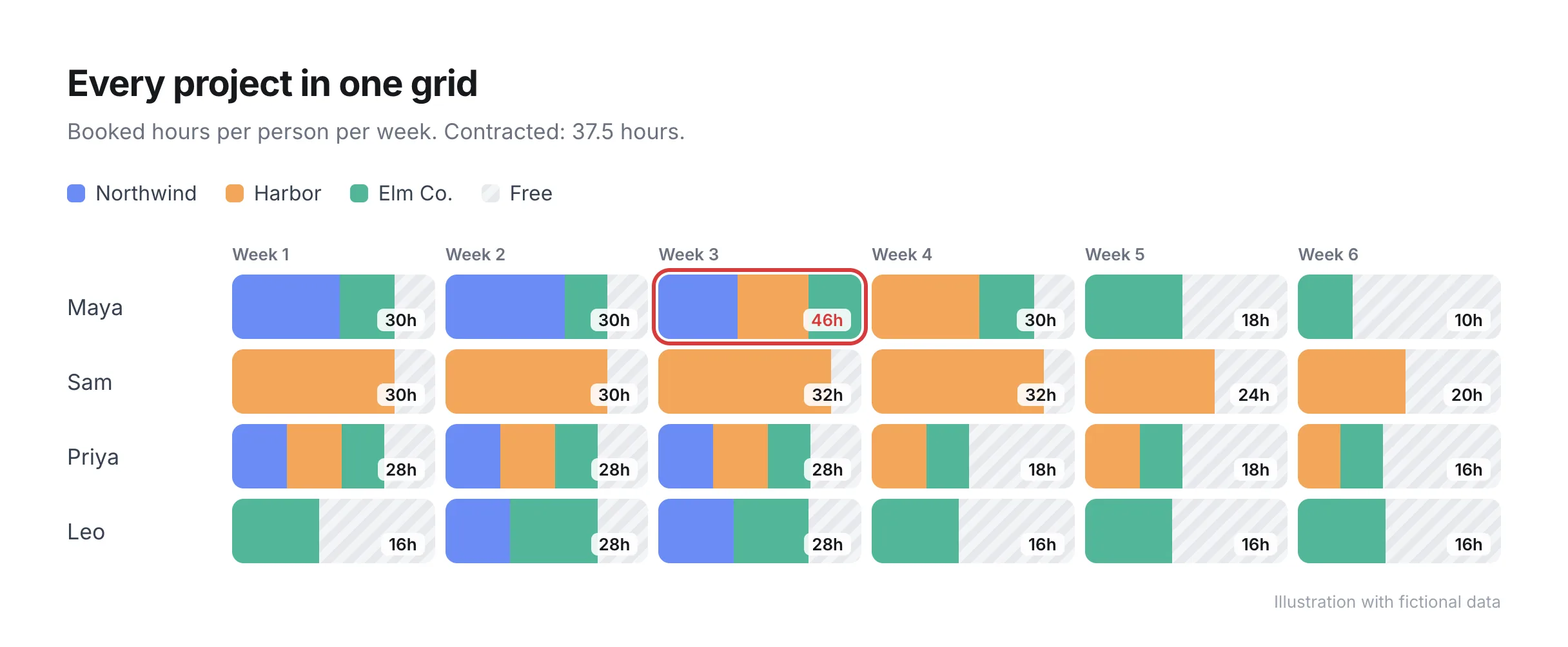
In the illustration above, Maya's week 3 shows 46 hours against 37.5 contracted. In four separate project plans, nobody would have spotted that. In the grid, it is the only red cell on the page.
A workable cross-project plan has five columns of information for every booking:
| Field | Why the plan needs it |
|---|---|
| Person (or placeholder role) | The row. Shared people are the reason for the plan |
| Project | Lets each project manager filter to their own work |
| Week | The unit most teams plan in. Days are too noisy, months hide conflicts |
| Booked hours | Compared against the person's contracted hours, minus time off |
| Status (confirmed or tentative) | Separates sold work from pipeline you expect to win |
Keep tentative bookings in the same grid, marked differently. A project you expect to sign next month competes for the same people as signed work, and the plan is only useful if both are visible together.
Decide which project gets a shared person before two project managers ask for the same week. When the team agrees the rule in advance, nobody has to argue each conflict from scratch. Without one, the loudest client or the most senior project manager wins by default.
A priority order that most teams can apply in a few seconds:
The order itself matters less than having one that everyone accepts. Write it down, share it with every project manager, and have the person who owns resourcing apply it when two bookings collide.
When one project slips, the hours booked on it move into later weeks, and those weeks usually already belong to another project. The slip is one problem. The collision two or three weeks later is a second problem, and most teams only find that one when it arrives.
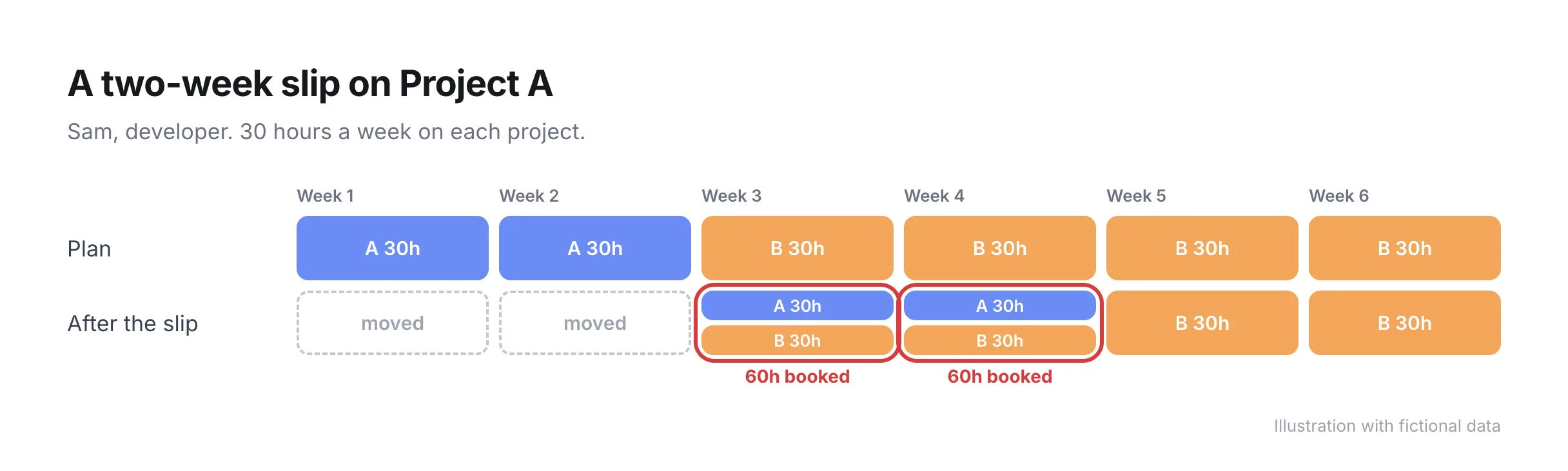
Here is a worked example. Sam, a developer, is booked 30 hours a week on Project A for weeks 1 and 2, then 30 hours a week on Project B from week 3. The client on Project A delays their content by two weeks. Sam's Project A hours move to weeks 3 and 4. Sam now has 60 hours booked in each of those weeks.
The project manager on Project A has three honest options:
| Option | What changes | Who needs to hear about it |
|---|---|---|
| Push Project B by two weeks | Project B's dates move | Project B's client, before the move happens |
| Split Sam across both | Both projects run at half speed for two weeks | Both clients, with new dates |
| Bring in a second developer for Project A | Project A keeps its new dates, Project B is untouched | Finance, because a contractor changes the project's margin |
The wrong option is the silent one: leave both bookings in place and hope Sam works 60-hour weeks. When the plan shows the collision on the day the delay is announced, the project manager can choose between the three options with two weeks of notice instead of two days.
For work more than three or four weeks out, book a role instead of a named person. A placeholder such as "Senior designer" holds the hours, the skill and the cost rate until someone confirms who will do the work.
Booking roles first helps in two ways. With placeholders in the plan, you can read demand by skill across all projects and see whether you need another senior designer next quarter before any single project manager raises it. You also avoid locking in names too early, when the person you assumed would be free may well be on a different project by then.
Swap placeholders for names two to three weeks before the work starts, once the near-term schedule is stable.
Hold a weekly review to keep the plan accurate. Without one, bookings go stale within a fortnight and people stop trusting the grid. A short, fixed agenda works better than an open discussion:
Keep the review to the project managers and the person who owns resourcing. Decisions on client dates go to the account owner after the meeting, with the options already worked out.
You can tell the plan is working when conflicts surface weeks ahead instead of days. A few practical checks:
The last check is the most honest one. If a project manager still maintains their own copy, the shared plan is missing something they need, and it is worth asking them what.
Pike keeps every project in one capacity grid, with people as rows and dates as columns. Time off comes out of each person's available hours automatically, and you can book by total hours, hours per day, or a percentage of someone's capacity. Placeholder users hold skills, cost and bookings until a hire or a named person takes over. The resource planning features page shows the grid and the allocation options.
To check your numbers before changing tools, the free capacity calculator calculates available hours for a team from contracted hours, time off and non-billable time. For the steps that come before the multi-project plan, read the guides on resource allocation and resource capacity planning.
See every project your team is booked on in one grid: book a 15-minute walkthrough.
Put every project into one plan with people as rows and weeks as columns, and record booked hours per project in each cell. Compare each person's total against their contracted hours minus time off, agree a priority order for shared people, and review the plan for 30 minutes each week.
A single cross-project grid is the most reliable way. Separate project plans each look correct while the person's total runs past their contracted hours. In a grid by person and week, you can read the total for every person on one screen.
Agree the order in advance. A common order is fixed external deadlines first, then fixed-fee work close to budget, then retainers, then time-and-materials work, then internal and pipeline work. The person who owns resourcing applies the order when two bookings collide.
A spreadsheet works for a small team with a handful of projects. Past five or six concurrent projects, most teams fall behind on keeping bookings, time off and slips up to date, and project managers start keeping their own copies. That is usually the point to move to a resource planning tool.
Plan named people two to three weeks ahead and roles up to three months ahead. Near-term weeks need names because the work is about to start. Later weeks change too often for names to hold, and with role placeholders you can still read demand by skill without locking anyone in.
Share
 ISO 27001
 GDPR
 SOC 2 Type II
Built to keep sensitive client data secure and private.