

Project and development integration
Pike for GitHub
pull requests on every task
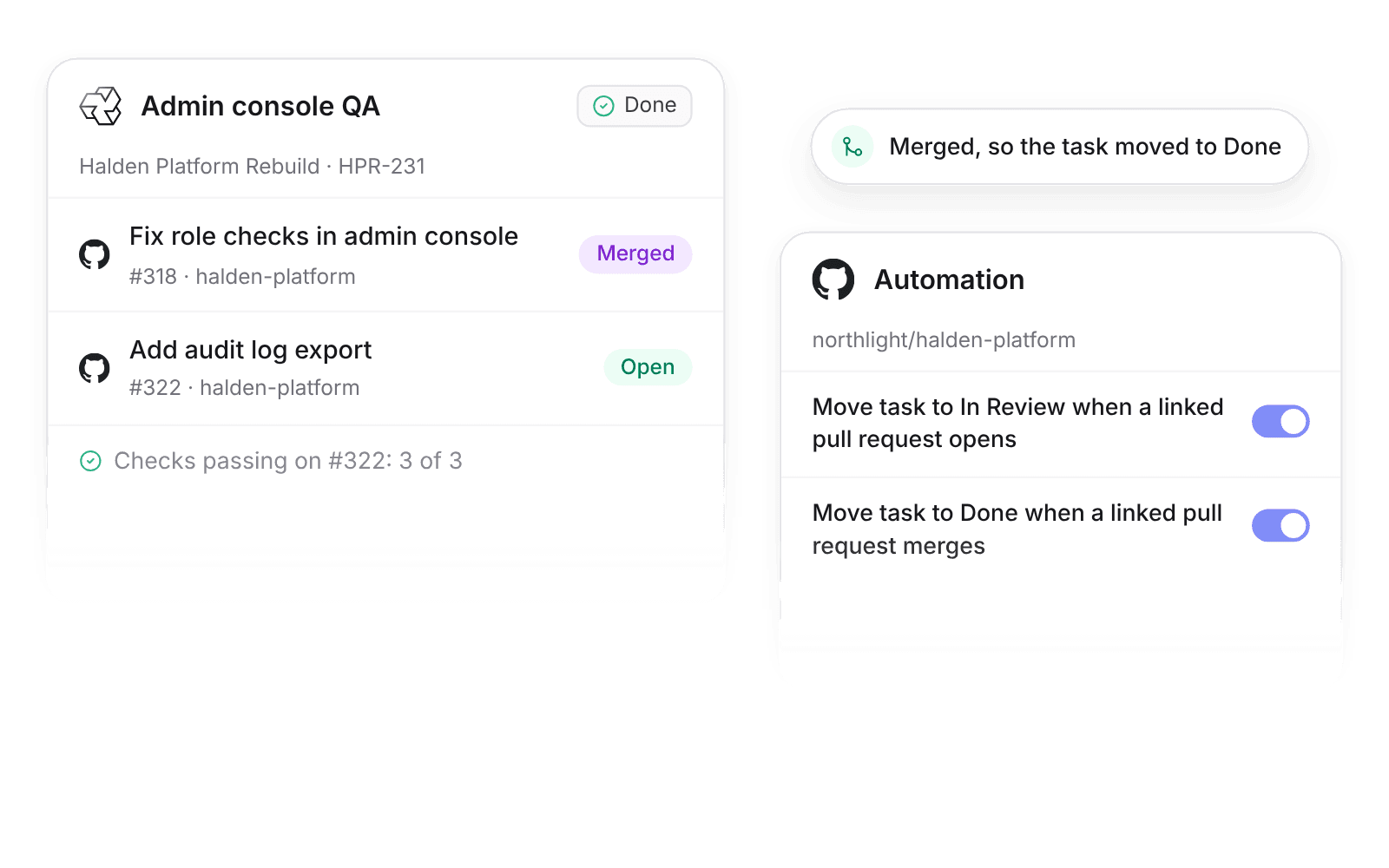
Pike integrates with GitHub: pull requests and commits link to Pike tasks, each task shows its pull requests with status and checks, and optional automation moves the task when a pull request opens or merges.
Last updated · Read as Markdown

At a glance
- Direction
- GitHub to Pike. Pike does not post to GitHub.
- Who sets it up
- A workspace admin installs the Pike GitHub App on an organization and chooses repositories.
- Linking
- A pull request or commit links when its title, branch name, or description contains the task's Pike URL or ID.
- Plan
- All plans
- Documentation
- GitHub docs
What syncs between GitHub and Pike
| GitHub | Pike | Notes |
|---|---|---|
| Pull request | Linked pull request on the task | Status (open, merged, closed) and checks |
| Commit | Linked commit on the task | |
| Pull request opened | Task moves to In Review | Optional, per repository |
| Pull request merged | Task moves to Done | Optional, per repository |
How to connect GitHub
- 1.Go to Workspace settings → Integrations → GitHub and click Add integration.
- 2.Install the Pike GitHub App on your organization and choose repositories.
- 3.Put the Pike task ID or URL in the branch name, pull request title, or description.
Full setup steps and field mappings are in the GitHub integration docs.
How agencies use Pike with GitHub
- Show clients what shipped. Account leads see merged pull requests on each task, so status reports come from the work itself.
- Keep task status current without updates. With automation on, tasks move to In Review and Done as pull requests open and merge, so board status matches the code.
- Check work before you bill it. Finance sees which billable tasks have merged pull requests before the invoice goes out.
Limits to know before you connect
- Pike does not sync GitHub issues.
- Pike does not post to GitHub.
GitHub integration questions
Does Pike integrate with GitHub?
Yes. The Pike GitHub App links pull requests and commits to Pike tasks when the title, branch name, or description contains the task's Pike URL or ID.
Can Pike move a task to Done when a pull request merges?
Yes. Turn on Move task to Done when a linked pull request merges for a repository in the GitHub integration.
Does the Pike GitHub integration sync GitHub issues?
No. The Pike GitHub integration links pull requests and commits to tasks. It does not sync issues.

See Pike and GitHub working together on your data.
 ISO 27001
 GDPR
GDPR SOC 2 Type II
Built to keep sensitive client data secure and private.